
Why You Need This
Most shop owners find this setting the first time something goes wrong. A staff member reopens an old order to “fix” a price, and next month the figures no longer match the return you already filed. Your accountant asks why June moved. Nobody can say when it changed, or who changed it.
Closing a sales period stops that happening. It connects to the rest of EasyBiz in four ways:
-
Your tax return. Once you have filed a month, the numbers behind it must stay exactly as filed. Closing the period is what guarantees that.
-
Your reports. A closed month cannot drift. When you reopen Understanding Your Sales Report six months later, it shows the same total it showed the day you filed.
-
Your accounting software. Refunds and corrections on a closed month are sent to QuickBooks or Xero as fresh credit notes in the current month, which is the way your accountant expects to receive them — not as a change to a period they have already reconciled.
-
Your staff. Nobody has to remember which months are off limits. EasyBiz simply stops the edit and shows them the right way to make the correction instead.
Where to Find It
-
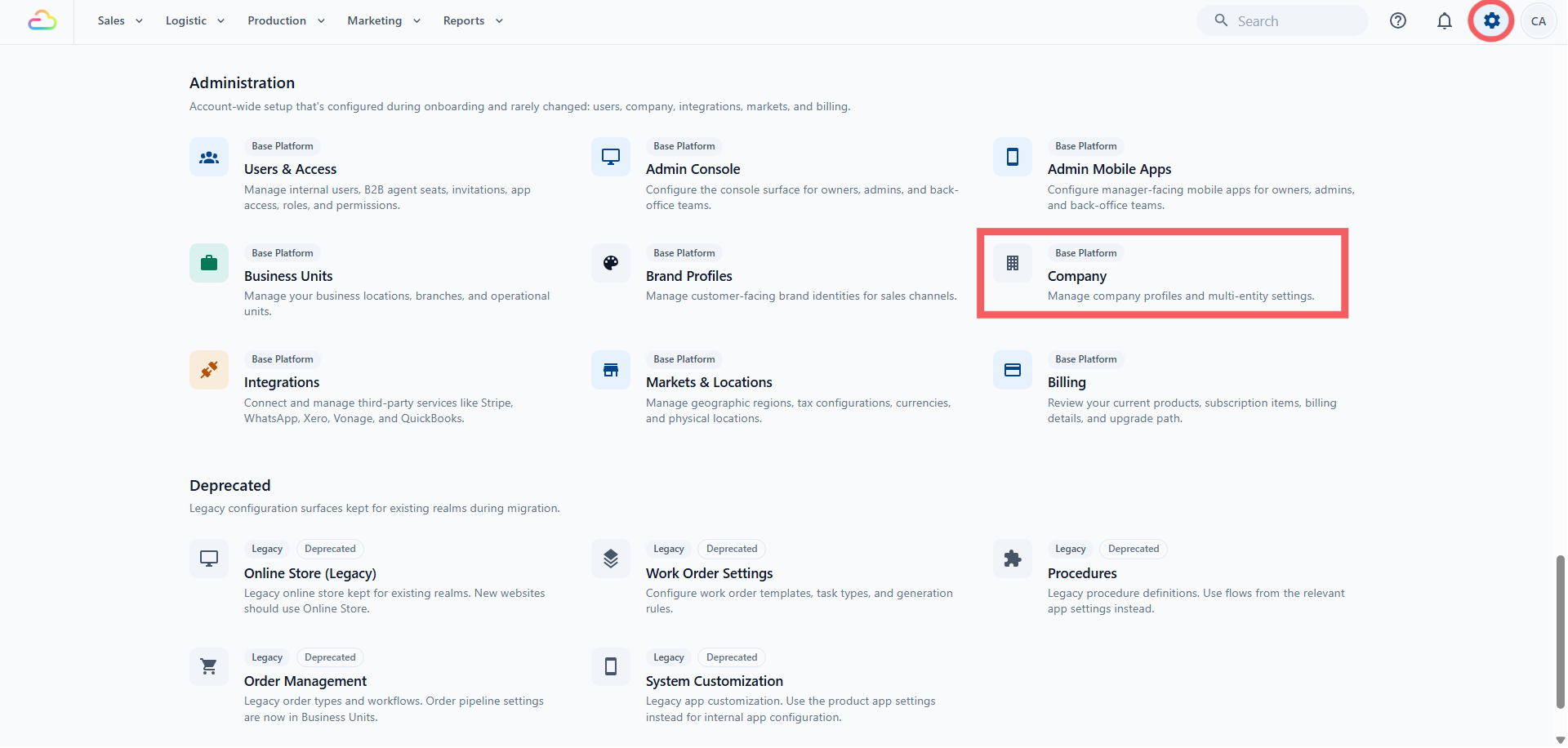
Click the ⚙️ Settings icon in the top-right corner.
-
Under the Administration section, click Company .
-
Open the Company you want to work on.
-
Scroll down to Sales period management .
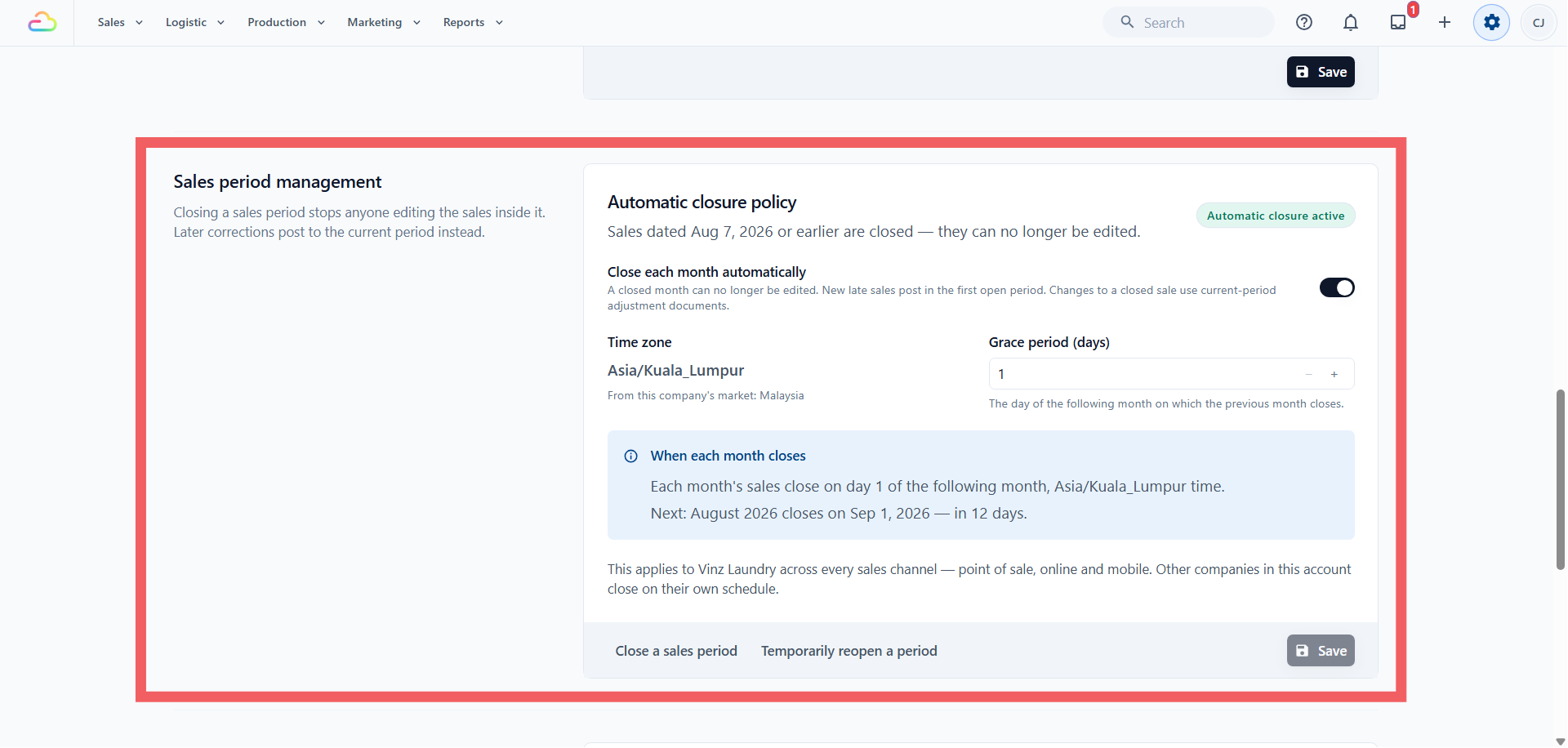
The panel is near the bottom of the Company page, after Tax Settings. If you run two Companies, each one has its own panel and closes on its own schedule — see Creating and Configuring a Company .
At the top of the panel you will see one of two lines:
-
“Sales dated 7 Aug 2026 or earlier are closed — they can no longer be edited”, which means everything up to and including 7 August is protected.
-
“No period is closed yet — every sale is still editable”, which means nothing is protected yet.
Next to it is a badge reading Automatic closure active or Automatic closure disabled .
What “Closed” Really Means
A closed date protects the money figures on a sale: the quantity, the price, the discount and the total. Those are the numbers that went into your accounts and your tax return.
It does not freeze the order itself. Your team can still:
-
Add a note to the order
-
Change work order details, photos or item descriptions
-
Take a payment against an old unpaid order
-
Print or re-send the receipt
What they cannot do is change what that old sale was worth.
What Each Setting Means
| Setting | What it does |
|---|---|
| Sales dated … or earlier are closed | The last protected date. If it reads 7 Aug 2026, every sale dated 7 August or earlier is locked. |
| Close each month automatically | Switches on the monthly schedule. It starts off. Turning it off later stops any future automatic closing, but months already closed stay closed. |
| Time zone | Decides when your business day and business month end. It comes from the Company’s Market and cannot be typed here — the panel shows where it came from, for example “From this company’s market: Malaysia”. A Company with no Market uses Singapore time. |
| Grace period (days) | The day of the following month on which the previous month closes. 1 means July closes on 1 August. 15 means July closes on 15 August. Any day from 1 to 31. It only does anything while automatic closing is on. |
| When each month closes | A plain summary of your rule and the next month due, for example “Each month’s sales close on day 1 of the following month, Asia/Kuala_Lumpur time. Next: August 2026 closes on 1 Sep 2026 — in 13 days.” |
Close a Month by Hand
Use this when you have finished checking a month and want it protected right now.
-
In Sales period management, click Close a sales period .
-
In Last date to close , pick the final date you have checked. You cannot pick a date in the future.
-
Type a short note in Reason (optional) , for example “July accounts submitted”.
-
Read the confirmation line, then click Close period .
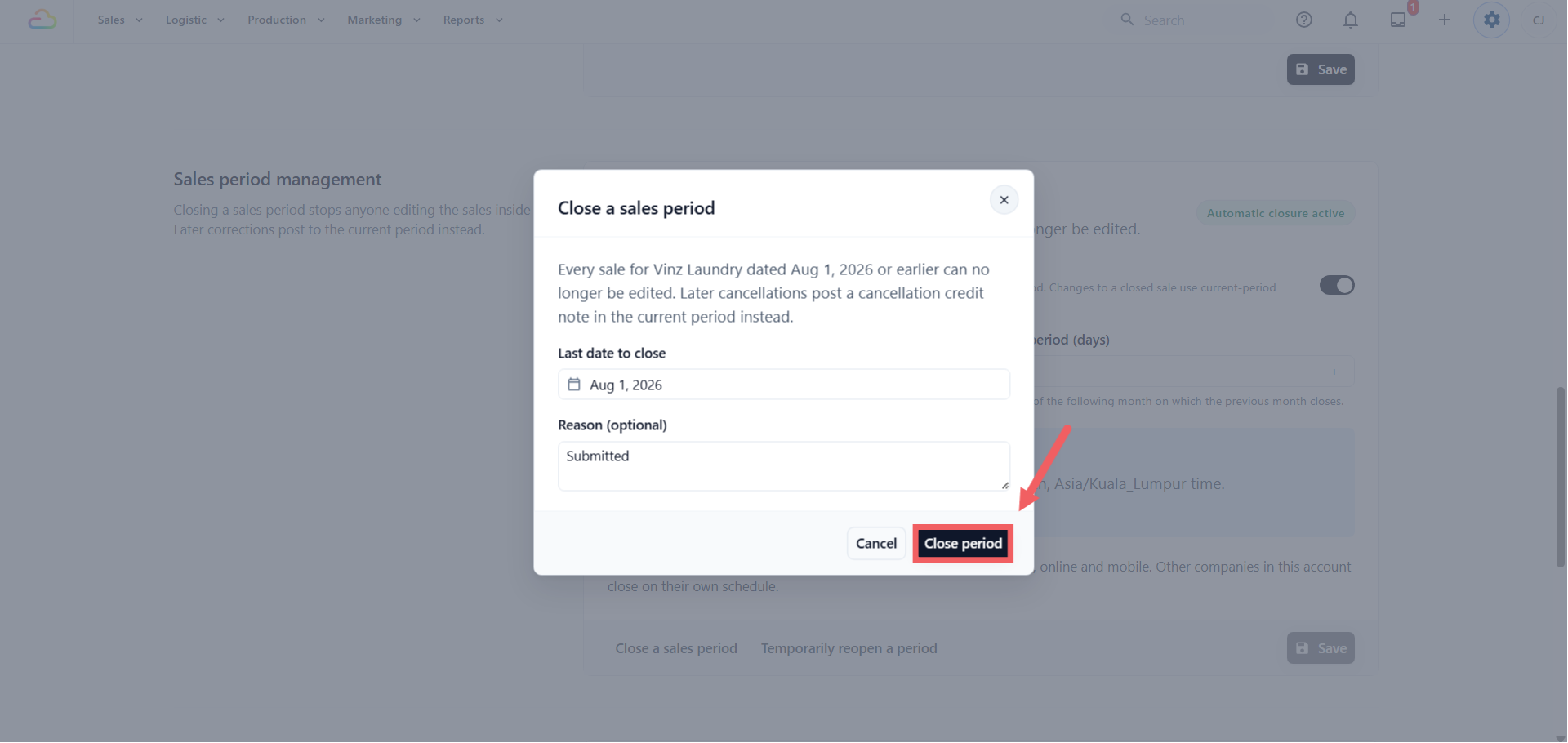
Picking 7 August protects every sale dated 7 August or earlier for this Company.
Where Refunds and Cancellations Go After You Close
This is the part most people want to know. Nothing is blocked, and nothing is lost. The correction is simply recorded in the month you are in now, so the month you filed stays as filed.
| What happens | Where it lands |
|---|---|
| A customer returns goods from a closed month | A credit note on today’s date |
| You cancel a confirmed order from a closed month | The refund goes through, and a cancellation credit note appears on today’s date |
| A staff member tries to change the price or discount on a closed sale | EasyBiz stops the edit and offers the right correction instead — see below |
| A late sale is entered with a date inside a closed month | It saves, and posts on the first open date |
| A note, photo or work order detail is edited on a closed order | Allowed, nothing moves |
So the short answer: the correction falls into the current month, not the closed one. Cancel an order on 14 August after closing through 7 August, and the adjustment sits on 14 August.
When an edit is stopped
If someone opens a closed sale and changes something that would move the money, EasyBiz does not just say no. A panel appears headed “This reported sale is closed”, explaining which date it was posted on and which date the Company is closed through, then offers one of two routes:
-
Issue a correction credit note -> when the change makes the sale smaller. The credit note is dated in the open period. The person needs the sales return permission to do this.
-
Raise a separate charge -> when the change makes the sale bigger. You add the extra amount through the normal order flow, in the open period.
Either way the original sale stays exactly as reported, and the difference appears in the month you are in now.
Where to See These Adjustments
Anything that was moved into a later month is listed for you, so you never have to guess.
-
Open Reports in the header menu.
-
Click Sales .
-
Scroll to Prior-period adjustments and pick a Posting month.
The table shows the order number, the adjustment type (credit note, amendment, void), the kind (Return, Cancellation or Correction), the posting date, the original sale date, the sales channel and the amount. Both dates are there, so you can always trace an August credit note back to the July sale it belongs to.
This is also the first place to look when two reports disagree, see Why Report Totals Can Differ .
Temporarily Reopen a Month
Use this only when your accountant must genuinely restate a month you have already filed. For an ordinary refund or cancellation, let the credit note post in the current month as described above.
-
Click Temporarily reopen a period .
-
In Reopen from this date , pick the first date that should become editable again. If you closed through 7 August and reopen from 7 August, only 7 August opens — 6 August and earlier stay protected.
-
Type a reason in Reason (required) , for example “Correcting the July return we filed”. This one cannot be left blank.
-
Click Reopen period .
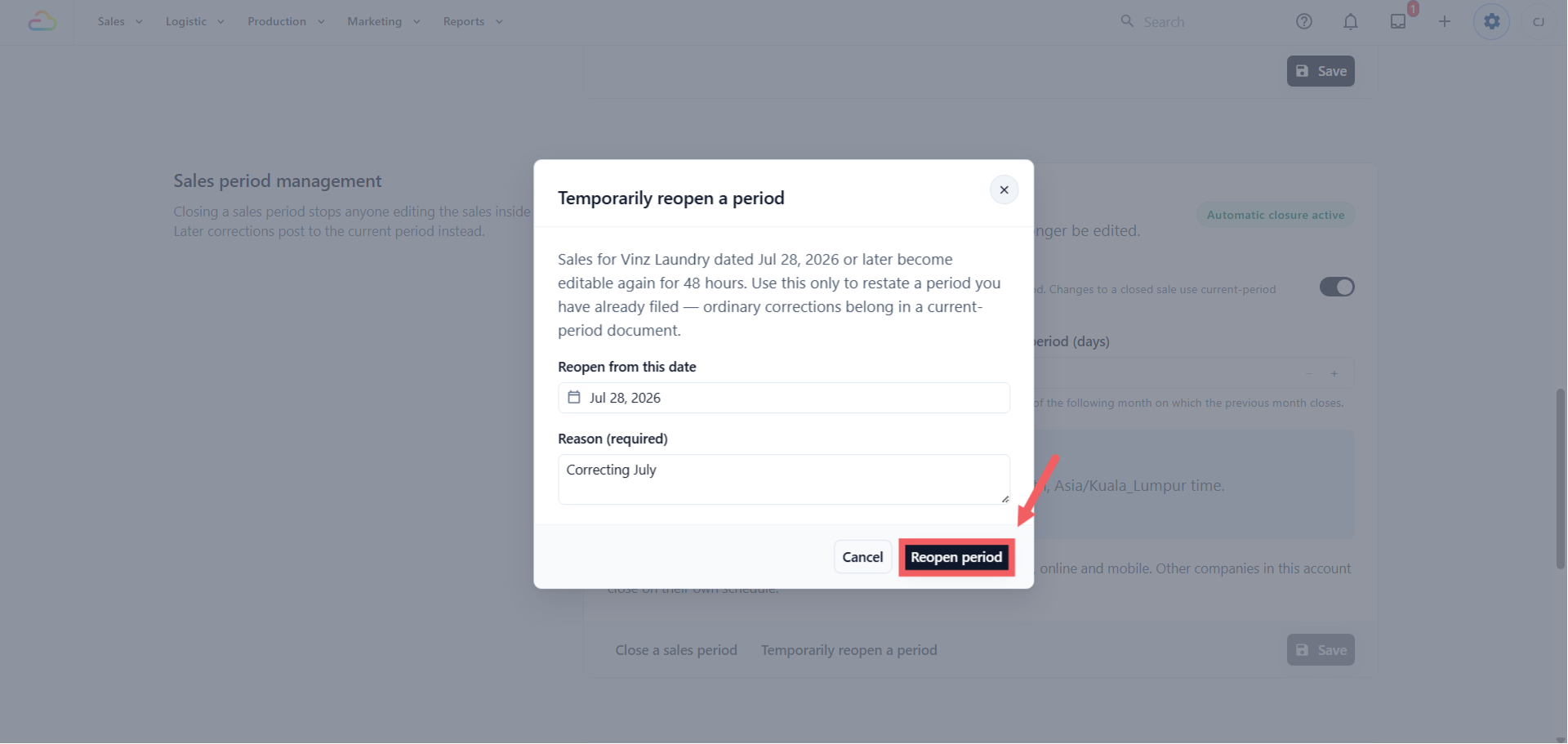
The window lasts 48 hours and then closes by itself. You do not need to remember to close it again. While it is open, the panel shows an “Active reopen window” banner with the exact expiry time.
FAQs
Does closing a month stop my shop taking orders?
No. Your team keeps selling, refunding and cancelling exactly as before. The only thing refused is an edit that would change what an old sale was worth.
A customer wants a refund on a sale from a closed month. What do I do?
Nothing different. Process the return as usual. The refund goes through, and the credit note posts on today’s date in the current month, so your filed month stays as reported. This is the correct accounting treatment, not a workaround.
Does closing a month for one Company close it for my other Company?
No. Each Company closes on its own schedule, even when both sell in the same country. Inside one Company, closing covers every sales channel at once — counter, online and mobile.
I turned automatic closing off. Did last month reopen?
No. Switching it off only stops future months closing on their own. Months already closed stay closed until someone reopens them on purpose, with a reason.
Why does my late sale show a different date in the report?
A sale dated inside a closed month posts on the first open date instead, so it cannot change a month you have filed. The original date is kept on the order, and both dates appear in Reports → Sales → Prior-period adjustments.
Can I change the time zone?
Not here. It follows the Company’s Market, and a Company’s Market cannot be changed after the Company is created.
Will my accountant see these corrections in QuickBooks or Xero?
Yes. A correction on a closed month is sent across as a credit note in the current month, dated the day it was made, so it reconciles against the period your accountant is currently working on rather than one they have already closed.
Can I undo a period close?
Not directly, and that is the point. Use Temporarily reopen a period. It needs a reason, lasts 48 hours and is recorded against your name.
What’s Next
Continue to Setting Up Tax and Rounding Rules to check the tax rate and rounding applied to every sale under this Company, or read Understanding Your Sales Report to see where these numbers end up.