
What Is the AI Assistant?
The AI assistant is a chat panel built into your EasyBiz Console. Think of it as a team member who has read every Help Center guide and can see your business data — you type a question in plain language, and it answers with real information from your own account.
You can ask it things like "How do I set up auto reply rules?" or "Show me this month's sales" and get an answer in seconds, without digging through menus or guides yourself.
Where to Find It
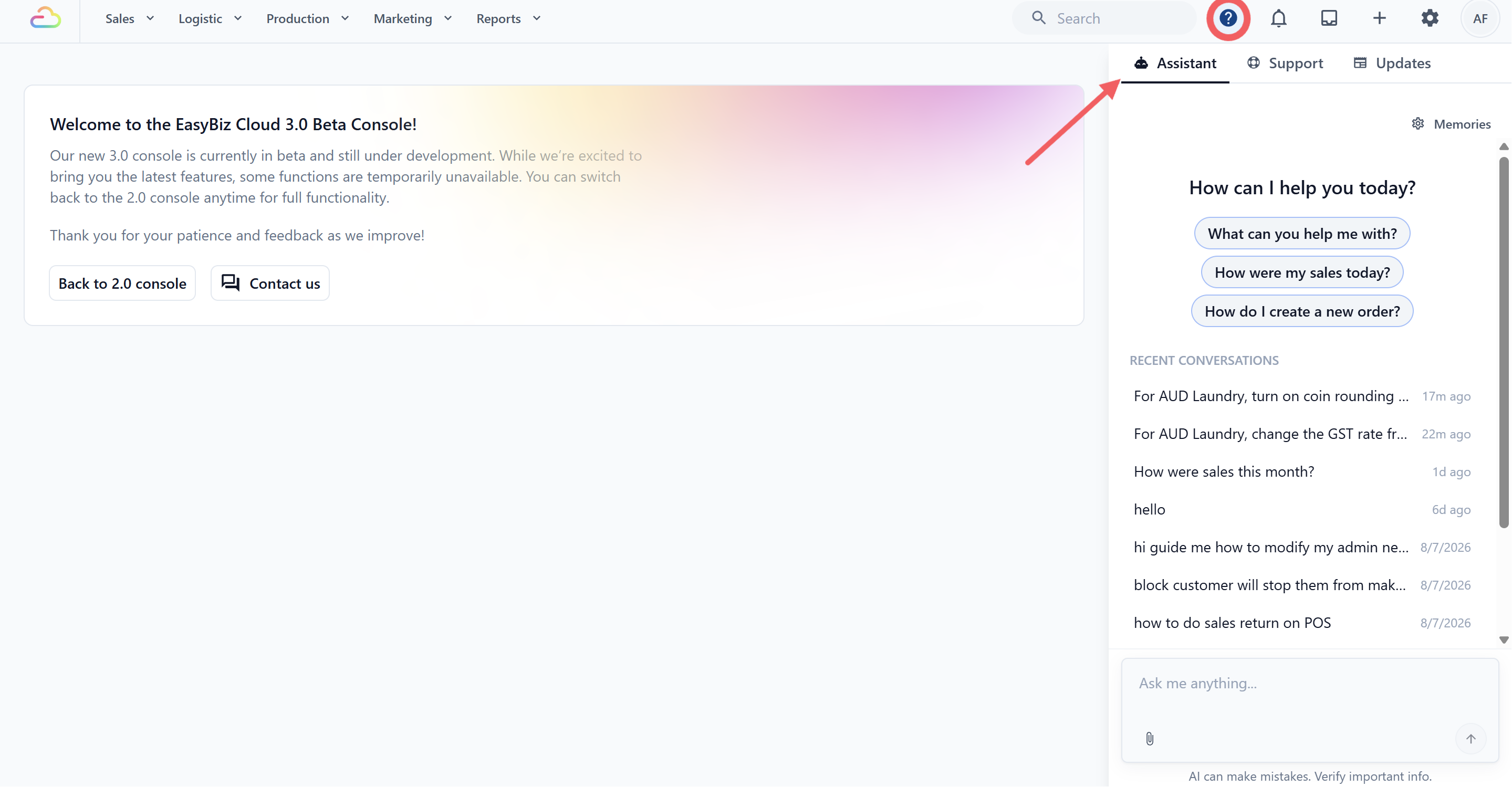
Click the Help icon (question mark) in the top bar of your EasyBiz Console.
A panel opens on the right side of your screen with three tabs: Assistant, Support, and Updates.
The Assistant tab is selected by default — type your question in the chat box to start.
What You Can Ask
The assistant handles a few kinds of requests today:
| What you ask | What the assistant does |
|---|---|
| How-to questions — "How do I create a price list?" | Answers using the guides in this Help Center, step by step |
| Business lookups — "How were sales this month?" | Looks up your own orders, customers, payments, outstanding receivables, and sales reports |
| Finding settings — "Where do I change my tax rate?" | Points you to the exact settings page, and can open the form for you |
| Setup changes — "Add a PayNow payment method" | Prepares the change and shows it to you for approval before anything is saved |
| Order follow-ups — "Send a payment link for this order" | Prepares a WhatsApp payment link or message to that order's customer, which you approve before it is sent |
| Getting human help — "I need to talk to support" | Opens a support ticket with the EasyBiz team for you |
Some example prompts a shop owner might use day to day:
"How do I set up my loyalty points program?"
"How many orders did we take yesterday?"
"Which customers still owe us money?"
"Change our GST rate to 9%."
"Where do I edit my receipt footer text?"
You Stay in Control
The assistant never changes your settings on its own. Whenever you ask it to make a change, it works like this:
You describe what you want in plain language.
The assistant shows you exactly what it plans to change, as a card in the chat.
Nothing is saved until you click Approve. You can also reject the change.
Approving changes is reserved for owners and admins. If a team member asks for a change they cannot approve themselves, the assistant waits for an owner or admin to approve it.
What It Won't Do
To keep your business data safe, the assistant deliberately does not:
Create or edit orders, order line items, or order statuses
Apply discounts to orders or issue refunds
Collect or record payments
Send SMS or email, or message any phone number that is not an existing order's customer
Create or edit customer profiles, jobs, or bookings
If you ask for one of these, the assistant will tell you it cannot do it and point you to the right place in the Console to do it yourself.
Some settings — such as price lists, message templates, auto reply rules, and business hours — the assistant can explain and guide you through, but will not change for you. See Using the AI Assistant for Setup for the full picture of what it can change versus what it can only guide you on.
Where Its Answers Come From
For how-to questions, the assistant answers from this Help Center — the same guides you are reading now. It does not make up steps: if no guide covers your question, it says so and points you to the closest Console page instead, and you can always ask it to open a support ticket.
For business questions, it reads data from your own EasyBiz account only — your orders, your sales, your customers.
Usage Limits
The Console assistant comes with your Full seat. It is commercially unmetered. This means EasyBiz does not charge by question, conversation, or approved change. There is no daily conversation limit or separate AI plan allowance.
- Long conversations — a single very long conversation can reach its size limit. If that happens, start a new conversation and continue there.
If It Didn't Work
The panel does not show an Assistant tab — make sure you are signed in to the EasyBiz Console, not the POS. The Console assistant comes with a Full seat. Ask your account owner or admin to check that your Full seat is active.
The assistant says it cannot make a change — that change may be one it can only guide you on. Ask "where do I change this?" and it will point you to the right settings page.
The answer looks generic or wrong — give it more detail. "Sales for Bishan outlet last week" works better than "sales".
It stopped replying mid-conversation — the conversation may have reached its size limit. Start a new conversation.
Frequently Asked Questions
Is this the same as the WhatsApp Chatbot? No. The WhatsApp Chatbot serves your customers inside WhatsApp. The AI assistant serves you and your team inside the Console.
Can the assistant change my prices? No. Price lists are guide-only — the assistant can explain how pricing works and take you to the Price Lists page, but you make the edits yourself. See Create Price Lists.
Who can approve changes? Owners and admins. Other team members can chat with the assistant, but changes wait for an owner or admin to approve.
Does the assistant see my business data? It can look up data from your own EasyBiz account to answer your questions — orders, customers, payments, and sales. It only works within your account.
What if it doesn't know the answer? It tells you it has no documented answer, points you to the closest Console page, and can open a support ticket with the EasyBiz team if you ask.
What's Next
Ready to let the assistant do some of your setup work? Continue to Using the AI Assistant for Setup to see exactly which settings it can change for you and how the review-and-approve flow works.