
What this tab sets
The Cancel & reschedule tab of a business unit sets 3 things:
- How far along an order customers and staff can still cancel it.
- What a late cancellation or a lockout costs the customer.
- Until when customers can move a booked pickup, delivery or visit by themselves.
One rule covers all of this business unit's orders, whether they came from the POS, the Console, your Online Store, the Mobile App or WhatsApp.
Each section has its own Save button. Saving one section doesn't change the other. Your changes apply as soon as you save. You don't need to publish your store.
It helps you:
- Let customers fix their own mistakes, without messaging your staff.
- Stop customers cancelling an order after your driver has collected it.
- Keep a fee when a customer cancels a visit at the last minute, or your worker can't get in.
- Stop staff cancelling orders that are already too far along.
- Spend less time rearranging pickups by phone or WhatsApp.
Can I skip this? Yes. If you leave this tab alone, customers can't cancel or reschedule by themselves. They have to contact you. Your staff can cancel at any time, as long as their role allows it, and no fee is charged.
Open the Cancel & reschedule tab
- Click the ⚙️ Settings icon, then click Business Units.
- Click the business unit.
- Click the Cancel & reschedule tab.
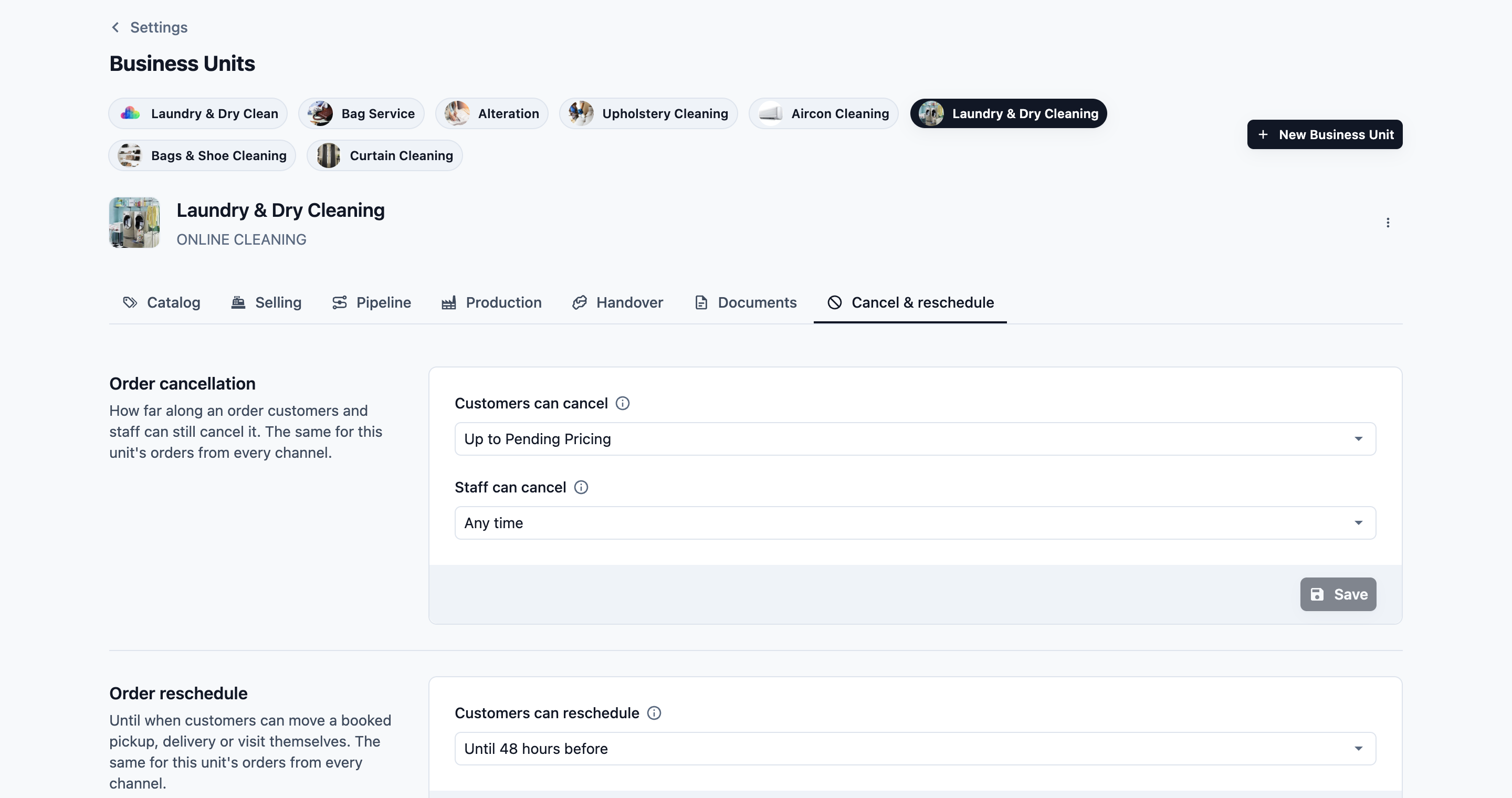
Order cancellation
Here you choose the last step at which an order can still be cancelled, and the fees for a late cancellation or a lockout. A step is one stage of your order pipeline, such as Pending Pickup. Once an order moves past the step you choose, it can no longer be cancelled that way.
There are 5 fields. The first 2 decide who can cancel, and until which step. The other 3 set your fees.
Customers can cancel
This decides whether customers can cancel their own order, and until which step.
| Option | What it means |
|---|---|
| Never | Customers can't cancel. They have to contact you. This is the default. |
| Up to [step] | Customers can cancel while the order is at this step or an earlier one. |
The list shows your steps grouped under Online orders, Production and your handover methods, such as Store pickup, Home delivery or On-Site Service.
Customers cancel on the order's page in your Online Store and Mobile App. Cancelling also cancels the order's pickup or visit. You get the usual cancelled-order notification, so you always know.
Customers can never cancel an order that has any payment on it, even a small deposit. Instead, they see "This order has a payment, so it can’t be cancelled here. Contact us to cancel it." This way, you stay in control of every refund.
Staff can cancel
This decides until which step your staff can cancel an order.
| Option | What it means |
|---|---|
| Any time | Staff can cancel at any step. This is the default. |
| Up to [step] | Staff can cancel while the order is at this step or an earlier one. |
This list also includes your POS orders steps, because staff handle walk-in orders too.
The limit applies in the Console and at the POS. If a staff member tries to cancel an order that's too far along, they see a message such as: Staff can cancel these orders up to "Pending Pickup". Ask the account owner to cancel it. The account owner can always cancel any order.
Late cancellation
This decides how close to the visit a cancellation counts as late.
| Option | What it means |
|---|---|
| None | There's no late cancellation fee. This is the default. |
| Within 12, 24, 48 or 72 hours of the visit | A visit cancelled this close to its booked start time keeps the Late cancellation fee. |
It only counts for on-site visits, not for pickups or deliveries.
Late cancellation fee
This is how much of the order you keep when a visit is cancelled late. You can choose it once you've set Late cancellation. It starts at 50%.
| Option | What it means |
|---|---|
| 25%, 50% or 100% of the order | That share of the order's total is kept as the fee, GST included. |
Lockout fee
This is for when your worker arrives and can't get in.
| Option | What it means |
|---|---|
| None | There's no lockout fee. This is the default. |
| 25%, 50% or 100% of the order | Office staff can close the order keeping that share of the order's total as the fee, GST included. |
Only office staff charge a lockout fee, from the order in the Console. Your workers can't charge it from the staff app.
Neither fee is ever charged on an order that has a payment on it, or that isn't priced yet.
To set it up:
- In the Order cancellation section, click Customers can cancel.
- Choose Never, or the last step customers can cancel at.
- Click Staff can cancel.
- Choose Any time, or the last step staff can cancel at.
- To charge for late cancellations, click Late cancellation and choose how many hours before the visit. Then click Late cancellation fee and choose the share.
- To charge for lockouts, click Lockout fee and choose the share.
- Click Save.
You see "Cancellation settings saved".
If you later remove a chosen step from your pipeline, the field shows "The step chosen before is no longer in this unit's order steps. Choose another." Pick a new step and click Save.
When a fee is charged
A fee is charged in 2 ways:
- The customer cancels inside your Late cancellation window. They see the fee before they confirm (see What your customers see, below).
- Your staff close the order with a fee in the Console. This is for a late cancellation, such as a customer who calls the morning of the visit, or a lockout.
Either way, the order is closed, not voided:
- The order keeps the fee, GST included. A credit note credits back the rest.
- Its open visits are cancelled, so their time slots free up.
- If the customer chose a saved card or store credit at booking, it pays the fee straight away. Otherwise, the fee stays owed on the order.
- History shows what was kept, for example "Late cancellation: closed keeping 50% (SGD 54.50) as the fee".
An order that has a payment on it, isn't priced yet, or whose visit is already done can't be closed with a fee.
To close an order with a fee:
- Go to Sales › Orders and open the order.
- At the bottom of the order, click Close with fee.
- Choose Late cancellation or Lockout: the worker could not get in. Only the fees your business unit charges are listed. The window shows what you keep, for example "Keeps SGD 54.50 (50%) as the fee".
- If you like, add a Note, such as "Customer called at 7 am".
- Click Close with fee.
You see "Order closed with the fee".
The button only shows on an open, unpaid order that has a price and whose business unit charges a fee. Staff need their role's Cancel order permission to see it. To cancel an order without a fee, use Cancel order as usual.
Order reschedule
Here you choose until when customers can move their own booking. A booking is a pickup, delivery or visit booked with one of your booking options.
Customers can reschedule
| Option | What it means |
|---|---|
| Never | Customers can't move their booking. They have to contact you. This is the default. |
| Until it starts | Customers can move it up to the start of the booked time. |
| Until 1, 2, 3, 6, 12, 24, 48 or 72 hours before | Customers can move it until that many hours before the booked time starts. |
Customers can only pick another time of the same booking option, at the rate they booked. For example, if the option charges more from 6 pm, a customer who booked a morning time is only offered times without that charge. They do this on the order's page in your Online Store and Mobile App, and in WhatsApp through your reschedule mini app. See Setting Up a Reschedule Pickup & Delivery Mini App.
When a customer moves a pickup, they choose the time of the delivery or visit after it in the same window. That job keeps its time if it still fits.
To set it up:
- In the Order reschedule section, click Customers can reschedule.
- Choose until when customers can still move their booking.
- Click Save.
You see "Reschedule settings saved".
Example setups
These are made-up examples to help you choose.
Brightway Laundry (home pickup and delivery)
- Customers can cancel: Up to Pending Pickup, under Online orders. Customers can cancel until the driver collects the bag. After that, they need to call the shop.
- Staff can cancel: Any time, so the counter can sort out any mix-up.
- Customers can reschedule: Until 12 hours before. That gives the driver's route time to settle the night before.
StitchRight Alterations (walk-in only)
- Customers can cancel: Never. Fabric is cut as soon as work starts, so every cancel goes through the shop.
- Staff can cancel: Any time.
- Customers can reschedule: Never, because customers drop off and collect in store.
CoolAir Aircon Services (on-site visits)
- Customers can cancel: Never. The technicians' days are planned ahead, so customers call to cancel.
- Staff can cancel: Any time.
- Customers can reschedule: Until 24 hours before, so the team can fill the slot.
Sparkle Home Cleaning (home cleaning visits)
- Customers can cancel: Up to Pending Service Visit, under On-Site Service. Customers can cancel until the visit is done.
- Staff can cancel: Any time.
- Late cancellation: Within 24 hours of the visit, with a Late cancellation fee of 50% of the order. The cleaner's day is already planned by then.
- Lockout fee: 100% of the order. The cleaner travelled and kept the slot free.
- Customers can reschedule: Until 24 hours before, so customers move a visit instead of cancelling it late.
What your customers see
Customers see these buttons on the order's page in your Online Store and Mobile App.
Here's what a Brightway customer sees on her order page:
She opens her order. Next to her pickup, she sees a Reschedule button.
She clicks it. The Reschedule pickup and delivery window shows when both are booked for, then "You can change it until…" with her deadline.
She picks a new day and time, then clicks Confirm new time. If she changes her mind, she clicks Keep time.
At the bottom of the order page, she sees a Cancel order button.
She clicks it. The window says "We’ll cancel the order and any pickup or visit booked for it. This can’t be undone."
She clicks Cancel order to confirm, or Keep order to go back.
After the deadline, the Reschedule button is gone. She sees "This can no longer be rescheduled online. Contact us to change it." Once the driver has collected her bag, the Cancel order button is gone too.
Here's what a Sparkle customer sees when she cancels her SGD 109 deep clean 6 hours before the visit:
- Above the Cancel order button, she sees "Cancelling within the late cancellation window costs SGD 54.50."
- She clicks Cancel order. The window says "Your visit is soon, so cancelling now keeps a late cancellation fee of SGD 54.50. We’ll cancel the visit. This can’t be undone."
- She clicks Cancel order to confirm, or Keep order to go back.
Her visit is cancelled and the order is closed with the fee. She saved a card at booking, so it's charged SGD 54.50.
FAQs
Why can't my customer cancel, even though the order is still early?
Usually the order has a payment on it. Even a deposit, or a card payment still being processed, stops customers cancelling it themselves. They are asked to contact you, so you can cancel it and handle the refund. Inside your Late cancellation window, an order that isn't priced yet can't be cancelled online either, because there's no price to take the fee from. And while a quote waits for the customer's answer, they decline the quote instead of cancelling.
Do I need to publish my store after changing this tab?
No. Your changes apply as soon as you click Save.
Does this limit my staff when they reschedule?
No. The Customers can reschedule setting only applies to customers. Your staff can still move a pickup, delivery or visit in the Console or at the POS.
Can I charge a cancellation fee?
Yes. Set Late cancellation and a Late cancellation fee for visits cancelled at the last minute, and a Lockout fee for when your worker can't get in. See When a fee is charged, above.
Does the late cancellation fee apply to pickups?
No. The late cancellation window only counts for on-site visits, from the visit's booked start time. A customer can cancel a pickup with no fee, as long as Customers can cancel allows it.
Can my staff cancel an order without the fee?
Yes. Cancel order cancels the order with no fee, as long as Staff can cancel allows it. Close with fee is a separate button.
Does cancelling refund my customer?
Customers can only cancel orders with no payment on them, so there's nothing to refund. When a paid order needs cancelling, your staff cancel it and handle the refund.
What if an order doesn't go through the step I chose?
It can be cancelled while it's in an earlier part of the pipeline than your chosen step, but not once it reaches that part. For example, with Up to Pending Delivery (under Home delivery), an order the customer collects in store never reaches that step. It can be cancelled while it's in pre-production or production, but not once it's Ready for Collection.
Why doesn't my customer see the Reschedule button?
Customers can only move a booking that hasn't started yet, and only one booked with a booking option. If Customers can reschedule is Never, the job is already under way or done, or the booking wasn't made with a booking option, the button doesn't show.
What's next
Set up the rest of your online booking: Letting Customers Book Online.