
Before You Start
You need an EasyBiz Console sign-in with permission to view Repeat orders in Settings and access to the customer's orders. If you cannot see these pages, ask your workspace administrator to check your access.
Choose an existing repeat schedule that has already produced an order. Have the customer's name ready. You do not need to create or change a schedule to follow this guide.
CleanFast Laundry is the fictional shop used in this article. Use fictional customer details when preparing your own training examples.
What a Repeat Order Means
Repeat orders is the feature that creates orders at a regular interval. A schedule is the saved instruction: who the work is for, where it happens and how often it repeats.
Each order made from that schedule is a separate piece of work. It has its own order number, dates, items, price and progress. The schedule stays in place to arrange the next repeat.
For example, one weekly laundry schedule can produce a new order for this Friday and another for next Friday. Finishing this week's laundry does not finish next week's order.
When It Helps
Repeat orders suit work with an agreed, regular pattern.
For example, CleanFast Laundry collects a customer's laundry every Friday and returns it on Monday. The details usually stay the same:
- Collection and return address
- Collection and return times
- Customer instructions
Without a repeat schedule, your staff would need to do the following for every order:
- Create a new order.
- Select the customer.
- Enter the address.
- Book the collection and return.
A repeat schedule saves that repeated entry and helps avoid forgetting a regular collection.
What Happens Automatically
Details carried into the order
Each new order uses the saved details for that occurrence:
- Customer and address
- Notes and instructions
- Timing for that collection or service
- Sales channel — the store or ordering channel where the order belongs
- Business unit — the type of work, such as laundry
For a repeat made from an online booking, saved service choices and booking options carry forward too.
How pricing works depends on the booking:
- Priced at checkout: If the repeat contains saved items from a booking priced at checkout, those items use the current price list when the next order is created.
- Priced after collection: A laundry repeat creates an order for your staff to check and price. It does not copy last week's garment count or final total.
When the order is created
The time EasyBiz creates an order is separate from the time your staff collect the laundry or carry out the service.
For a repeat set up through an online booking, each next order is scheduled for creation:
- Two days before its first collection or service job
- At 9:00 am in the booking's market time zone
For example, a Friday collection is normally prepared on Wednesday morning.
Schedules created by staff can use a different order-creation lead time. Check the existing schedule rather than assuming every repeat follows the online-booking timing.
See How It Works
Inspect an existing repeat
- Open Settings in EasyBiz Console.
- Select Repeat orders.
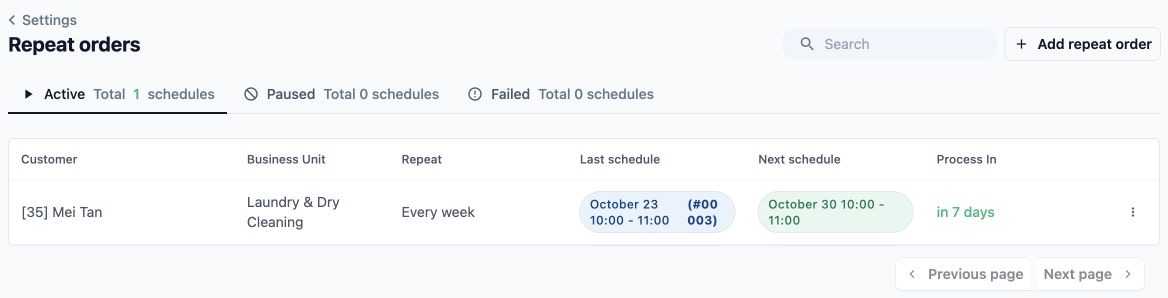
- Select the Active tab and find your example customer. Check the Repeat, Last schedule, Next schedule and Process In columns. The selected tab tells you that you are looking at active schedules.
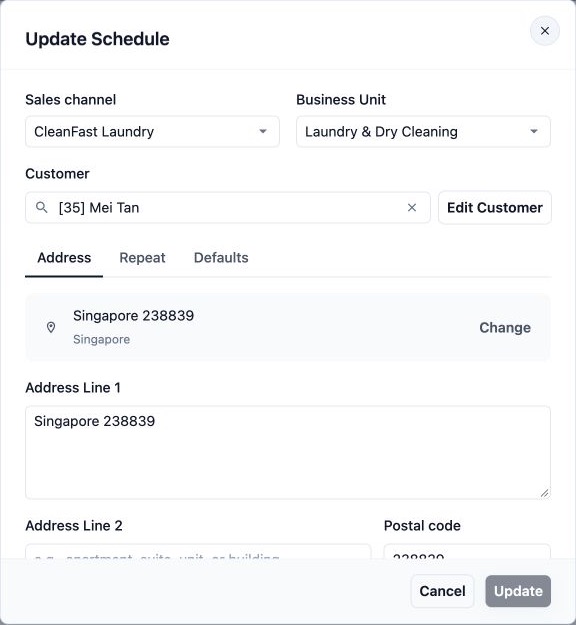
- Select the customer's row to open Update Schedule. On the Address tab, read the saved customer, sales channel, business unit and collection address. Leave the fields unchanged.
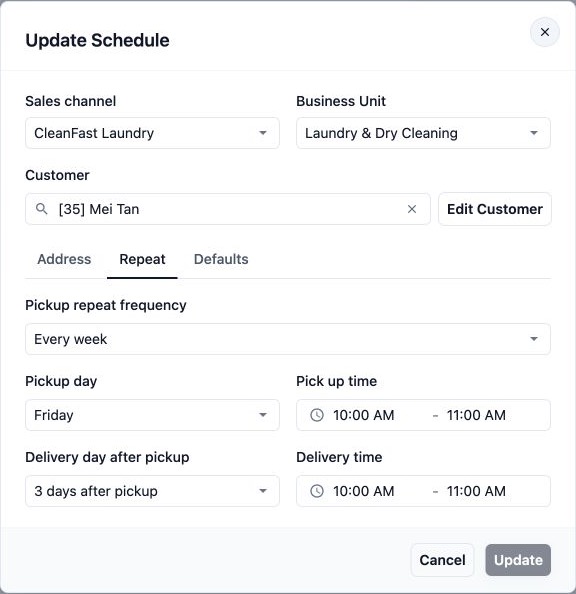
- Select the Repeat tab. For a collection-and-return laundry schedule, check Pickup repeat frequency, Pickup day, Pickup time, Delivery day after pickup and Delivery time. These describe the repeating service arrangement.
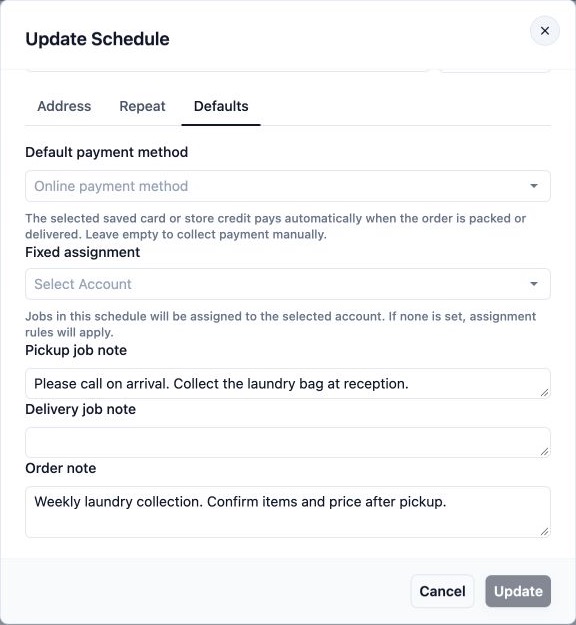
- Select the Defaults tab. Read Default payment method, Fixed assignment and any saved notes. These explain which payment and assignment instructions the schedule carries into its orders.
- Close the dialog without saving changes. Back in the list, note the order number displayed under Last schedule.
Inspect the individual order
- Open Orders.
- Enter the order number from Last schedule in Search orders....
- Find the matching result and check the customer before opening it.

- Open the order. Compare its customer, collection date, return date and notes with the repeat schedule. Check its items, pricing and current progress separately.
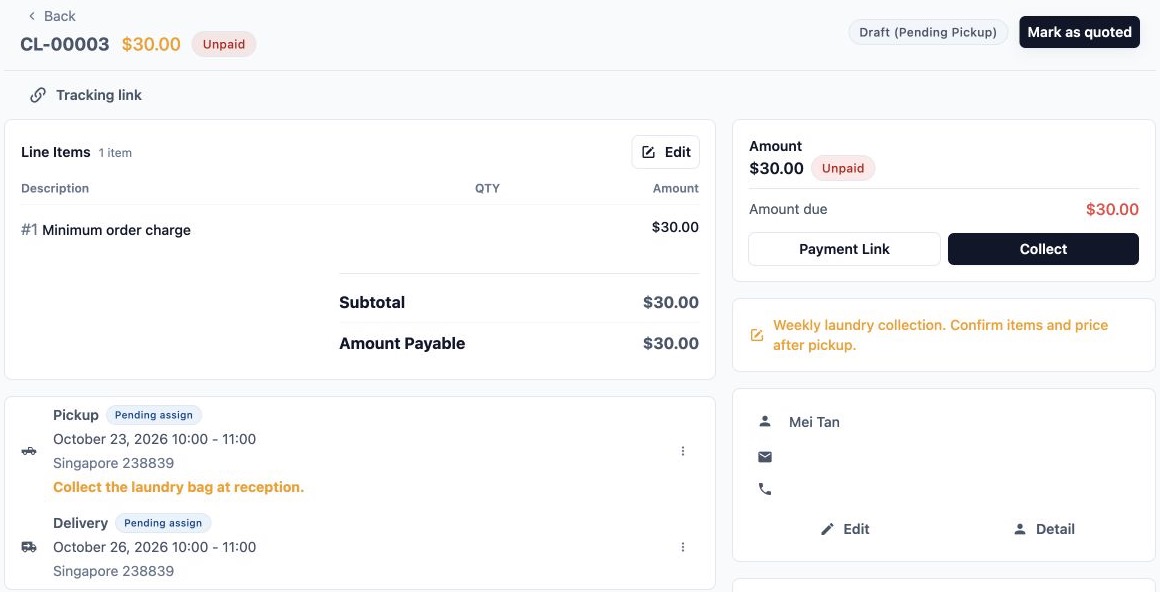
You have now seen both parts: the saved repeating arrangement and one individual order created from it. ]
Example Walkthrough
CleanFast Laundry has a customer who wants a collection every Friday, with clean laundry returned on Monday. The customer sets up a weekly repeat through the shop's Online Store. Their laundry is priced after collection.
- The repeating arrangement is saved. The schedule keeps the customer, address, weekly timing, collection and return details, and any saved booking instructions.
- The next order is prepared ahead of Friday. With the online-booking timing, it is due to be created on Wednesday at 9:00 am. This example assumes neither service date is blocked by the shop's settings.
- A separate order appears. It has its own order number and Friday collection and Monday return dates. Your staff can find it in Orders. The repeat schedule records the latest order and moves on to the following occurrence.
- Your staff prepare the collection. They check the order's address, instructions and assignment. The existence of the order does not mean a driver has already collected anything.
- Your staff check and price the laundry. After collection, they record the garments and quantities received. This week's total reflects this week's work.
- Your staff finish the order. They process the laundry, arrange its return and check payment through the normal order workflow. The following week's repeat remains a separate arrangement.
Afterwards, staff can see the individual order's progress and the schedule's next occurrence. A customer signed in to the relevant Online Store or Mobile App can see their generated order in their order list. Where the shop offers the Repeat orders page, the customer can also see their active repeating arrangement there.
The customer does not need to place the same booking again every week. Your staff still need to handle each collection and its laundry.
FAQs
Is a repeat order the same as a paid subscription?
No. A repeat order arranges recurring work. It does not, by itself, create a fixed monthly subscription fee or guarantee that every order has the same total. Each generated order has its own pricing and payment record.
Can each repeat use the customer's saved card or store credit?
Yes. A schedule's Default payment method can carry a saved card or store credit into each order. Automatic payment is tied to the order being packed or delivered, rather than the moment the repeat order is created. If no default is selected, collect payment through your usual process. Always check the order's payment result.
Does a repeat automatically assign a driver or staff member?
The schedule can have a Fixed assignment, meaning a particular account is selected for its jobs. If no fixed assignment is saved, the usual assignment rules apply. Your staff should still check the resulting jobs and dispatch arrangements. A repeat schedule alone does not guarantee a driver assignment.
Can customers see a repeat that my staff set up for them?
Yes, when it belongs to that customer on a sales channel used by their Online Store or Mobile App, and the shop makes the Repeat orders page available. It does not have to originate from an online booking. The customer must sign in to the account associated with the repeat.
What happens when a collection or return falls on a closed date?
EasyBiz checks the blocked dates configured for the business unit. It can move an affected collection or return to an available day while keeping the regular repeating pattern for later occurrences. If it cannot place the occurrence within the repeat period, it can skip that occurrence. Check the actual dates on the generated order before confirming arrangements with the customer.
What's Next
You now understand the difference between a repeat schedule and the orders it creates, when those orders appear, and what your staff still need to handle.
Continue with Set up your first repeat order. For changes to an existing arrangement, see Manage your repeat orders.