## Before you start
You need:
- **An EasyBiz account with Console access.** The Console is the EasyBiz back office you open in a web browser. If your staff will use the Design Agent, give them access to it first. See [Inviting Your Team and Managing Access](/docs/inviting-your-team-and-managing-access).
- **A short description of your business.** Your services, your outlets, their opening hours and what makes you different. A few lines in your phone's notes are enough.
- **A few photos, if you have them.** Your shop front, your team or your finished work. They are optional, and you can add up to 4 with each message.
---
## What the Design Agent is
The Design Agent is a designer built into EasyBiz. You tell it what you want in your own words, and it writes and designs it for you. The message you type is called a prompt. A prompt is simply an instruction to the AI, written the way you would brief a designer on WhatsApp.
It makes three things:
- **Websites.** A complete website with several pages about your business: your services, outlets, opening hours, contact details and photos.
- **Landing pages.** A landing page is a single web page with one job, such as one promotion or one ad. Customers land on it from your ad, a QR code or a WhatsApp message. See [Creating Landing Pages for Promotions and Ads](/docs/creating-landing-pages).
- **Images.** Logos, photos, illustrations and posters. Finished images are saved to your Media Center, so you can use them in posters and WhatsApp campaigns. See [Creating Logos, Photos and Posters](/docs/creating-images-with-design-agent).
Nothing goes online until you publish it. You can look, ask for changes and edit for as long as you like first.
### Why use it
- **No designer or web agency to pay.** You get a website, a promotion page or a poster without a quote, a deposit or weeks of waiting.
- **Nothing to learn.** There are no templates to pick and no website builder. If you can send a WhatsApp message, you can brief the Design Agent.
- **Changes in minutes.** New prices or a holiday closure? Ask for the change, check it and publish again.
If you skip it, customers who search for your shop online find old information or nothing at all. Many of them choose the shop that looks more established.
---
## Where to find it
1. In the Console menu, click AI.
2. Click Design Agent.

The Design Agent used to be called **Marketing Studio**. It's the same place with a new name, and everything you made in Marketing Studio is still there.
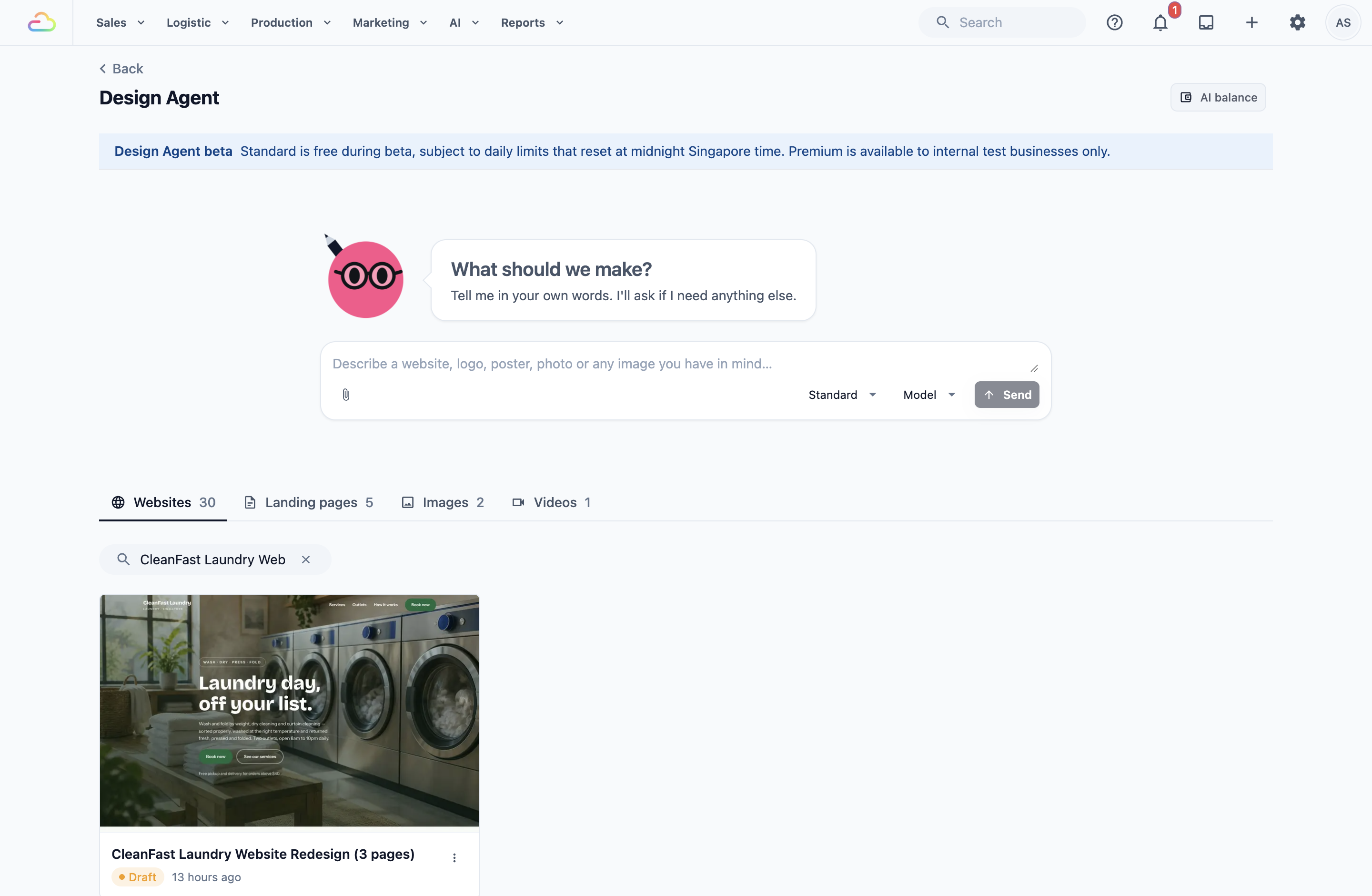
The page has three parts:
- The **Design Agent beta** banner, which explains the free beta.
- The message box under **What should we make?**, where you type your request.
- The Websites, Landing pages, Images and Videos tabs, which show everything you've made as cards. Videos aren't available to most businesses during the beta.
---
## Send your first request
1. Click the message box and describe what you want. Write it the way you'd explain it to a new designer.
2. To add photos, click the picture button under the box and choose up to 4 photos.
3. Leave the quality on **Standard**. **Premium** is only for internal test businesses during the beta.
4. Click Send.
5. If the Design Agent isn't sure what you want, it asks **What would you like to create?** Click One page for a landing page, A whole site for a website, or An image.
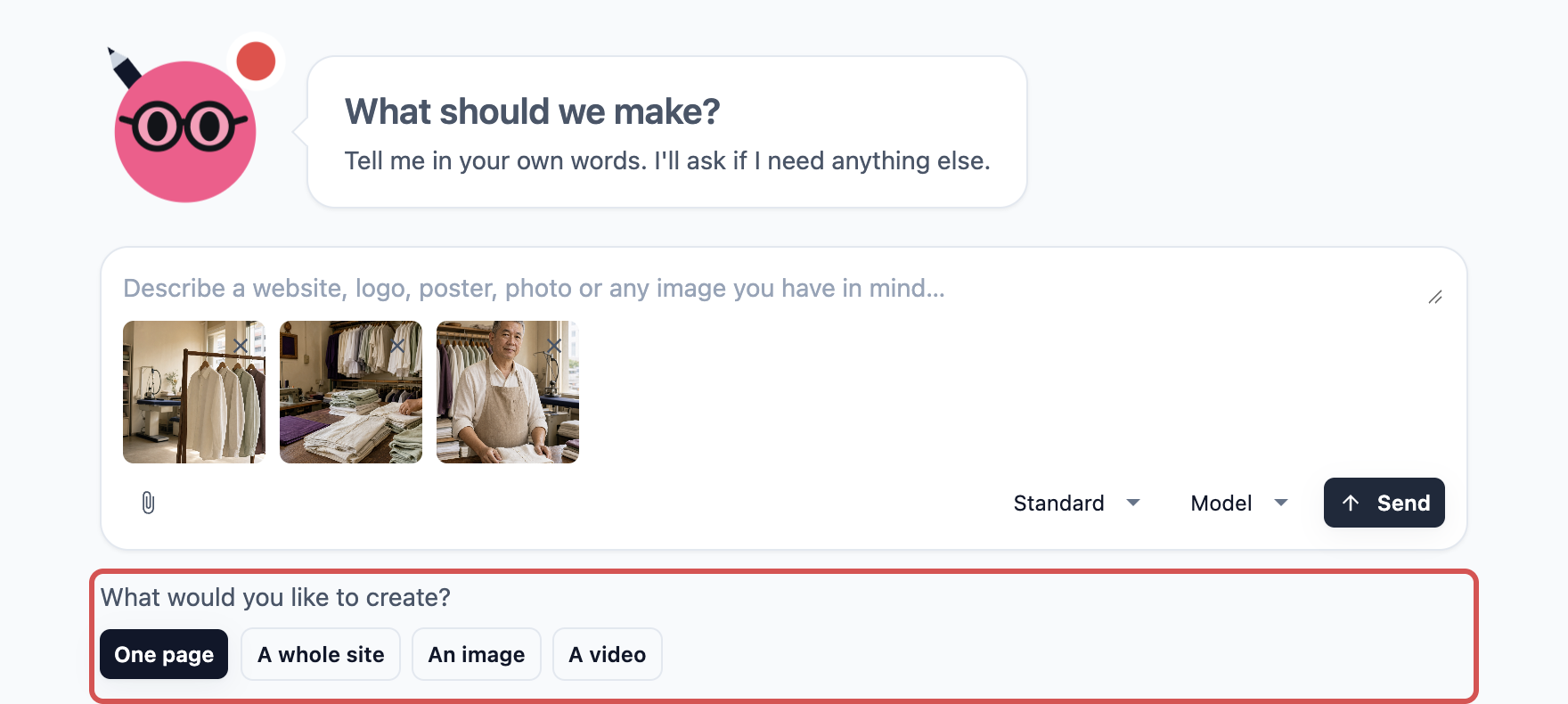
While it works, the button shows **Creating your website…** or **Creating your landing page…**. When the draft is ready, it opens, and a card appears under the matching tab. To come back to it later, click its card.
If the Design Agent needs more details, it asks you in the chat. Answer in your own words.
### Example requests you can copy
Change the details to match your shop.
- **A website:** "Make a website for Sparkle Dry Cleaners. We do dry cleaning, laundry by weight and curtain cleaning. We have 2 outlets, in Tampines and Bedok, open 9am to 9pm daily. Free pickup and delivery for orders above $30. Keep it clean and trustworthy, in blue and white."
- **The look of your current website:** "Here is my current website: sparkledry.com.sg. Keep the same look, but make it easier to read on a phone."
- **A landing page:** "Make one page for our Chinese New Year promotion: 20% off curtain and sofa cover cleaning until 15 February. Add a Book now button."
- **A logo:** "Design a simple, modern logo for Sparkle Dry Cleaners with a water drop and a hanger, in navy blue."
- **A change:** "On the home page, change the opening hours to 10am to 8pm and make the photos bigger."
### Tips for a good request
- Say who your customers are and what you want them to do, such as call you, WhatsApp you or book.
- Give real facts: prices, areas and hours. The more facts you give, the less the Design Agent has to guess.
- Ask for one change at a time, and say which part you mean, such as "the top of the home page".
You can also change words yourself without asking. [Creating and Editing Your Website](/docs/creating-and-editing-your-website) shows how.
---
## Design Agent website or Online Store?
A Design Agent website tells customers about your business, but customers can't book, pay or sign in on it. They do that in your Online Store. Most shops keep both and add a "Book now" button on the website that opens the Online Store. See [Introduction to Online Store and Mobile App](/docs/introduction-to-online-store-and-mobile-app).
---
## What it costs
- **Free during the beta.** The **Standard** quality is free while the Design Agent is in beta.
- **A daily limit applies.** Each business gets a free daily allowance, shared by everyone on your team. Bigger jobs, such as a whole website, use more of it than a small change. The allowance resets at midnight Singapore time.
- **After the beta.** The Design Agent's work will be paid from a prepaid AI balance that you top up when you need it. There's no monthly subscription for it. Before each request starts, you see an estimate and the most it can cost.
- **Editing and publishing yourself is free.** Changing words yourself and clicking Publish never use your AI balance.
- **Hosting.** Hosting means keeping your website online so customers can open it at any time. It's included in your EasyBiz subscription when your website uses its free address ending in .easybizcloud.app. Using your own domain costs extra. See [Publishing Your Website and Linking Your Own Domain](/docs/publishing-and-hosting-your-website).
Reaching the daily limit, or later running out of AI balance, only stops new requests to the Design Agent. Websites and pages you've already published stay online, and you can still edit and publish them yourself.
---
## Example: CleanFast Laundry
CleanFast Laundry has 2 outlets, in Jurong West and Clementi. Mrs Tan, the owner, wants three things: a website, a page for her school holiday promotion and a new logo.
1. She opens the Design Agent and sends: "Make a website for CleanFast Laundry. We wash, dry and fold by weight, and we do dry cleaning and duvet washing. Outlets in Jurong West and Clementi, open 8am to 10pm daily. Free pickup and delivery above $40." She adds 3 photos of her shop.
2. She checks the draft and asks: "Make the pickup and delivery part stand out more on the home page."
3. She starts a new request: "Make one page for our school holiday promotion: 15% off duvet washing until 31 December. Add a Book now button."
4. She sends a third request: "Design a logo for CleanFast Laundry: a T-shirt with a small lightning bolt, in green and white."
5. She publishes the website and the promotion page. The logo is saved in her Media Center.
### What customers see online
- Customers who open her website see her services, both outlets, opening hours and shop photos, on a phone or a computer.
- The promotion page has its own web address, so Mrs Tan can put it in a Facebook ad, a WhatsApp broadcast or a QR code at the counter.
- When customers tap "Book now", her Online Store opens, where they choose a pickup time and pay.
- Her new logo appears on the posters and WhatsApp messages she makes with it.
---
## FAQs
**Can my Design Agent website take bookings?**
> Not by itself. Customers book and pay in your Online Store. Add a "Book now" button to your website and set it to open your Online Store's web address. [Creating and Editing Your Website](/docs/creating-and-editing-your-website) shows how.
**What happens when I hit the daily limit?**
> The Design Agent shows "Your business has reached today's free Design Agent limit. Please try again after midnight Singapore time. Your AI credits have not been charged." Your drafts are kept. You can still edit and publish yourself, and you can ask the Design Agent again after midnight.
**My staff also use the Design Agent. Do we each get a daily limit?**
> No. The daily allowance belongs to your business, so every request from anyone on your team counts towards it. If several people are working on designs, agree who asks for the big jobs, such as a whole website.
**Will it replace my current website or Online Store?**
> No. Your current website stays exactly where it is, and your Online Store doesn't change. The Design Agent's website only goes online at its own .easybizcloud.app address when you publish it. It moves to your own domain only if you link it. See [Publishing Your Website and Linking Your Own Domain](/docs/publishing-and-hosting-your-website).
**What happens to my website if my EasyBiz subscription ends?**
> Customers see a page saying the website is unavailable until you renew. This also applies to a website on your own domain.
---
## What's next
You now know what the Design Agent makes, where to find it, how to ask for what you want and what it costs. Next, build your website step by step in [Creating and Editing Your Website](/docs/creating-and-editing-your-website).