## Before You Start
- You need an Online Store or Mobile App. See [Adding a Store and Turning On the Online Store or Mobile App](/docs/adding-a-store-and-turning-on-online-store-or-mobile-app).
- Decide both rewards: what the new customer gets, and what the customer who shared the code gets. Each reward is a coupon.
---
## Set Up the Rewards
1. Click the ⚙️ Settings icon in the top-right corner, then under **Sales channels** click Online Store & Mobile App.
2. On your store's card, click Edit Online Store. It reads **Edit Mobile App** or **Edit Online Store & Mobile App** when the Mobile App is on.
3. Under **Pages**, click Refer a friend.
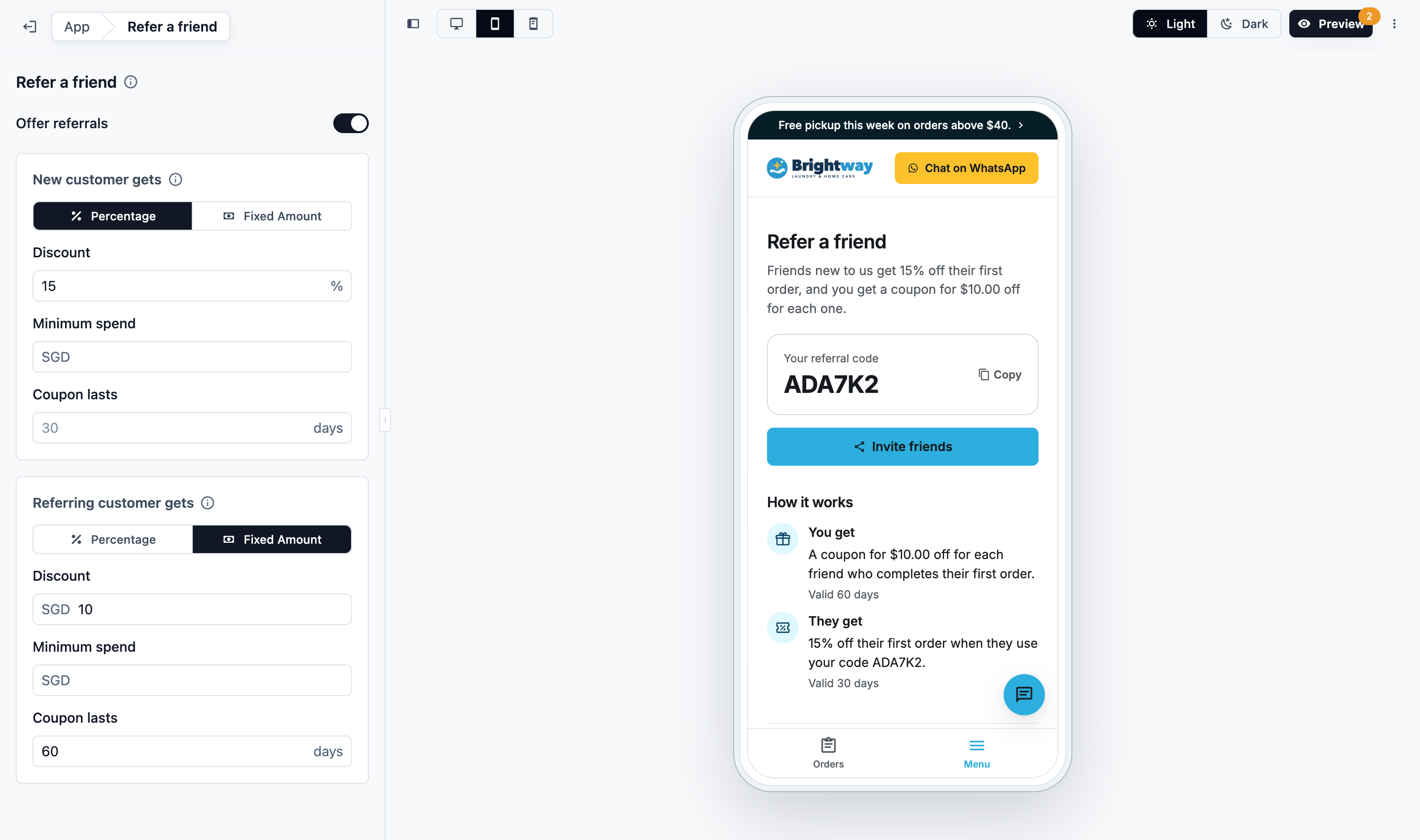
4. Switch on **Offer referrals**.
5. Fill in both rewards, **New customer gets** and **Referring customer gets**. Each has the fields below.
6. Preview and publish your store. See [Edit, Preview and Publish Your Online Store](/docs/edit-preview-and-publish-your-online-store).
| Field | What it means |
| --- | --- |
| Percentage or Fixed Amount | The kind of discount. |
| Discount | The percentage, or the amount off in your store's currency. |
| Minimum spend (optional) | The order must reach this amount for the coupon to apply. Leave empty for any order. |
| Coupon lasts | How many days the coupon stays valid once given, from 1 to 365. The default is 30 days. |
Both rewards must be filled in. Until they are, the store runs no referrals and the Refer a friend page says there is no referral offer right now.
A bag repair shop sets **New customer gets** to $10 off with a minimum spend of $50, and **Referring customer gets** to 15% off. Mei shares her code with Ken. Ken signs up, books a $60 repair and pays $50. When the repair is completed and paid, Mei gets a 15% off coupon in her account.
You can also show a Refer a friend card on the Orders page. In the editor, open the **Orders** page, click **Add card** under **Cards**, and choose **Refer a friend**.
---
## What Your Customers See
**The customer who shares**
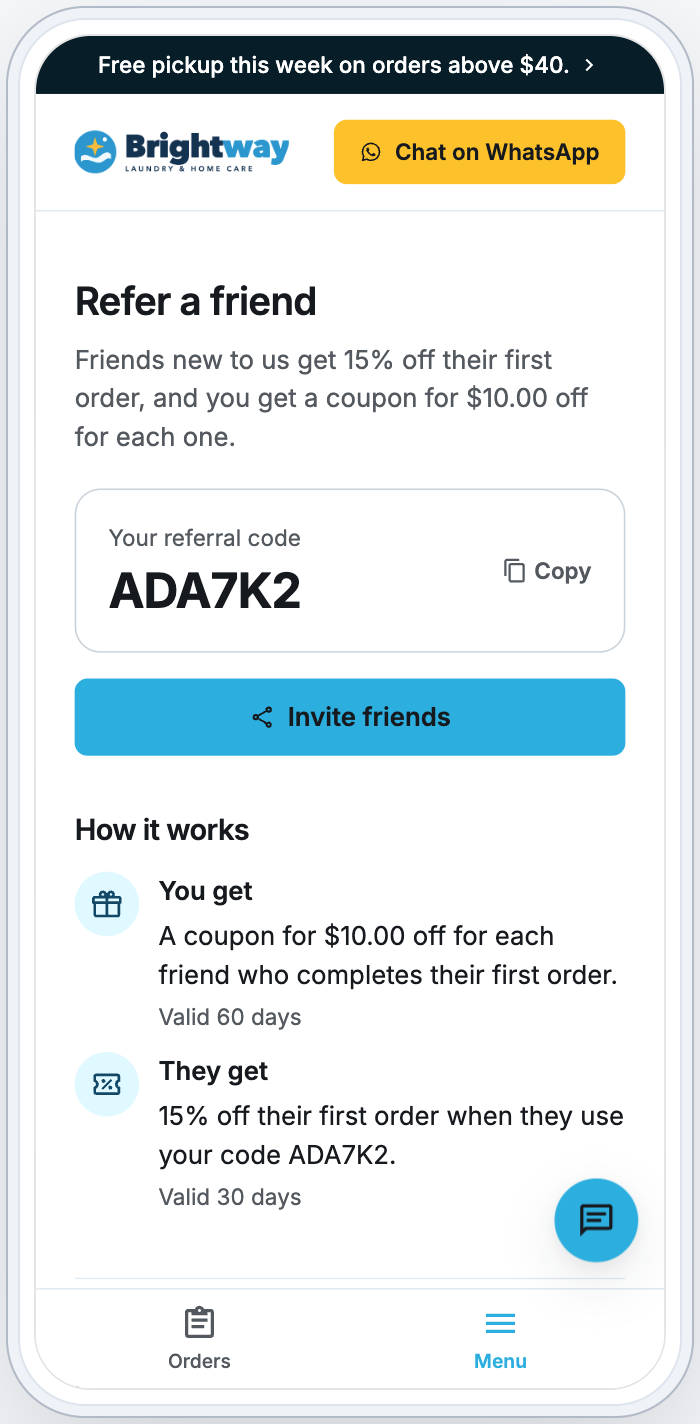
On the **Refer a friend** page, a signed-in customer sees:
- **Your referral code** with Copy.
- Invite friends, which shares a message with their code and a link to your store.
- **How it works**: what they get and what their friend gets.
When a friend's order with the referral coupon is completed and paid, the customer gets their coupon. It appears in their account, ready to use on their next order.
**The friend**
The friend opens the shared link and signs up. The referral coupon goes into their account and is already chosen when they book: the booking page says their friend's code is applied.
The friend can also type the code like any coupon code:
- With **Add coupon** on the booking's review: the coupon is used on that booking.
- Under **Redeem a code** on the Promotions page: the coupon goes into **Your coupons**. They use it with Book now there, or choose it with **Add coupon** when they book.
The invite link opens your Online Store's booking page, on your own domain once you have linked one, otherwise on your store's easybizcloud.app address. Invites sent from the Mobile App use the same link. If the store has no Online Store, the invite carries the code only.
---
## Who Can Use a Referral Code
- Only customers who have never ordered from you, and only once.
- Customers can't use their own code, including from another email address that goes to the same inbox.
- Two customers can't refer each other.
The customer who shared the code is rewarded only when the friend's order uses the referral coupon and is both completed and paid. Each friend earns them one reward.
---
## FAQs
**When does the referring customer get their coupon?**
> When the friend's order with the referral coupon is completed and paid. A booking alone, or an unpaid order, does not count.
**Can I change the rewards?**
> Yes. Change them on the Refer a friend page and publish your store. A friend who already added a referral coupon keeps the rewards that applied when they added it.
**Where can the referring customer's coupon be used?**
> On their next order, online or at your counter. Fixed amounts and minimum spends are in your store's currency.
**Is Refer a friend the same as a coupon?**
> No. A coupon is one offer you create for everyone. Refer a friend gives each customer their own code and rewards them for each new customer. See [Setting Up Coupons and Online Promotions](/docs/setting-up-coupons).
---
## What's Next?
- To create coupons and show them on your Promotions page, see [Setting Up Coupons and Online Promotions](/docs/setting-up-coupons).
- To put your changes live, see [Edit, Preview and Publish Your Online Store](/docs/edit-preview-and-publish-your-online-store).