## Before you start
- Sign in to the Console. The Console is the back-office website where you run your business.
- The account owner sees every report. Your staff only see the reports you open for them. [Giving Your Staff Access to Reports](/docs/report-access-for-staff) shows how.
## What your reports are for
A report is a summary of what already happened in your shop. It adds up your orders, payments and customers, so you don't have to count them by hand.
Your reports help you decide things. Should you chase a customer who still owes you money? Do you need more staff on Saturdays? Is your new outlet pulling its weight?
Without them, you only see one order at a time. You would miss a slow week, an unpaid bill that keeps getting older, or a drop in returning customers until it hurts.
## Open the Reports menu
1. Sign in to the Console.
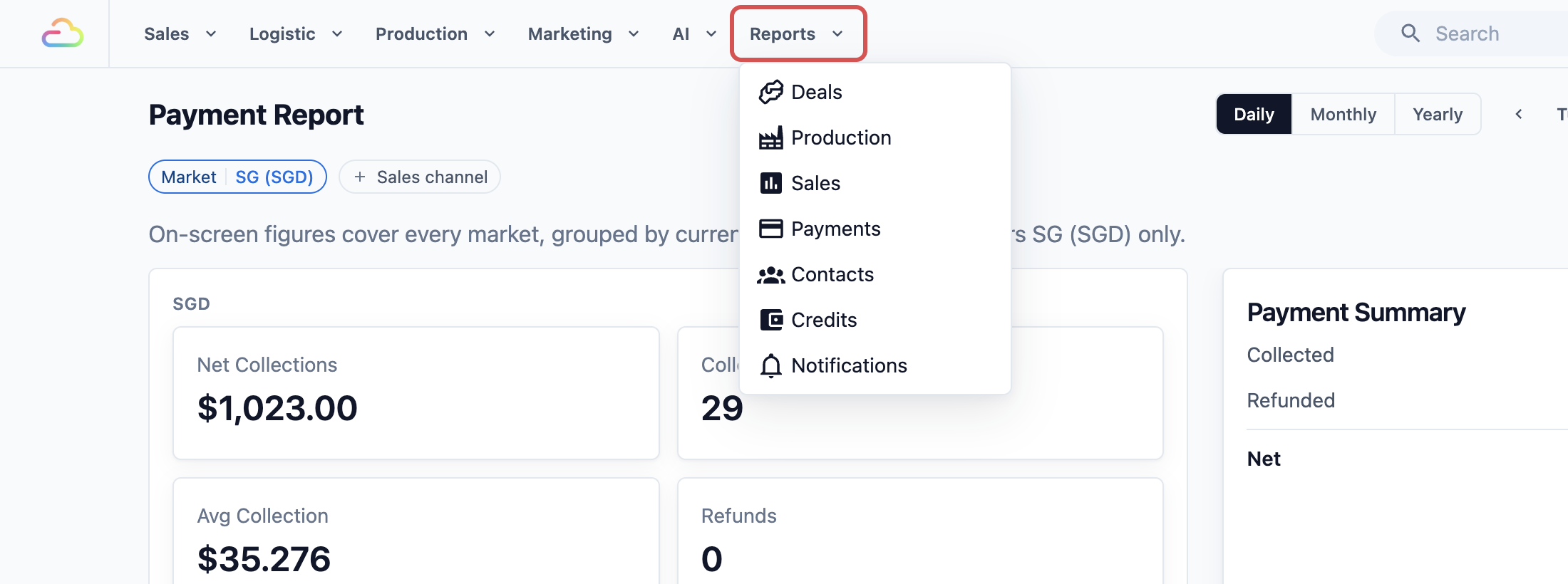
2. In the menu bar at the top of the screen, click Reports.
A list of reports drops down. Click any name to open that report.
## What the Reports menu holds
- Deals: how many customer enquiries came in, how fast your team replied and how many became orders.
- Production: how many work orders your workshop finished, the hours spent and any redos.
- Sales: what you sold in a day, month or year, by service, item and sales channel. A sales channel is any place you take orders, such as an outlet or your online store.
- Payments: the money you actually collected, by payment method such as cash, card or PayNow.
- Contacts: how many customers came in, who your top customers are and how often they come back.
- Credits: the store credit your customers topped up, spent and still hold.
- Notifications: how the month's app notifications to your customers went, and the WhatsApp messages they saved you.
- E-Invoice: the monthly file you upload to the MyInvois portal. This only appears for businesses in Malaysia.
## Where Receivables and Downloads sit
Two more pages work closely with your reports, but they live in other menus.
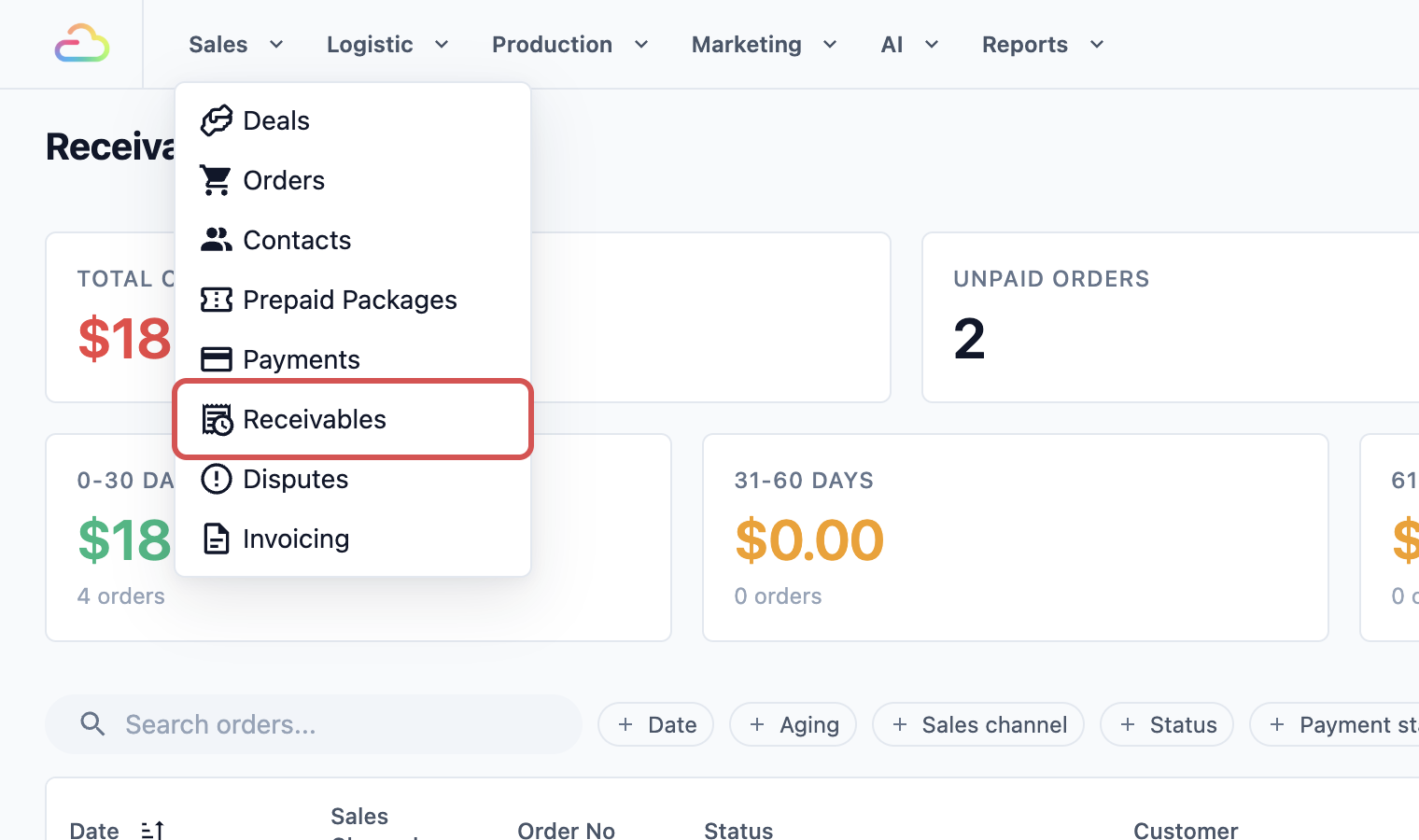
Receivables lists the money customers still owe you. A receivable is an order that is not fully paid yet.
1. In the menu bar, click Sales.
2. Click Receivables.
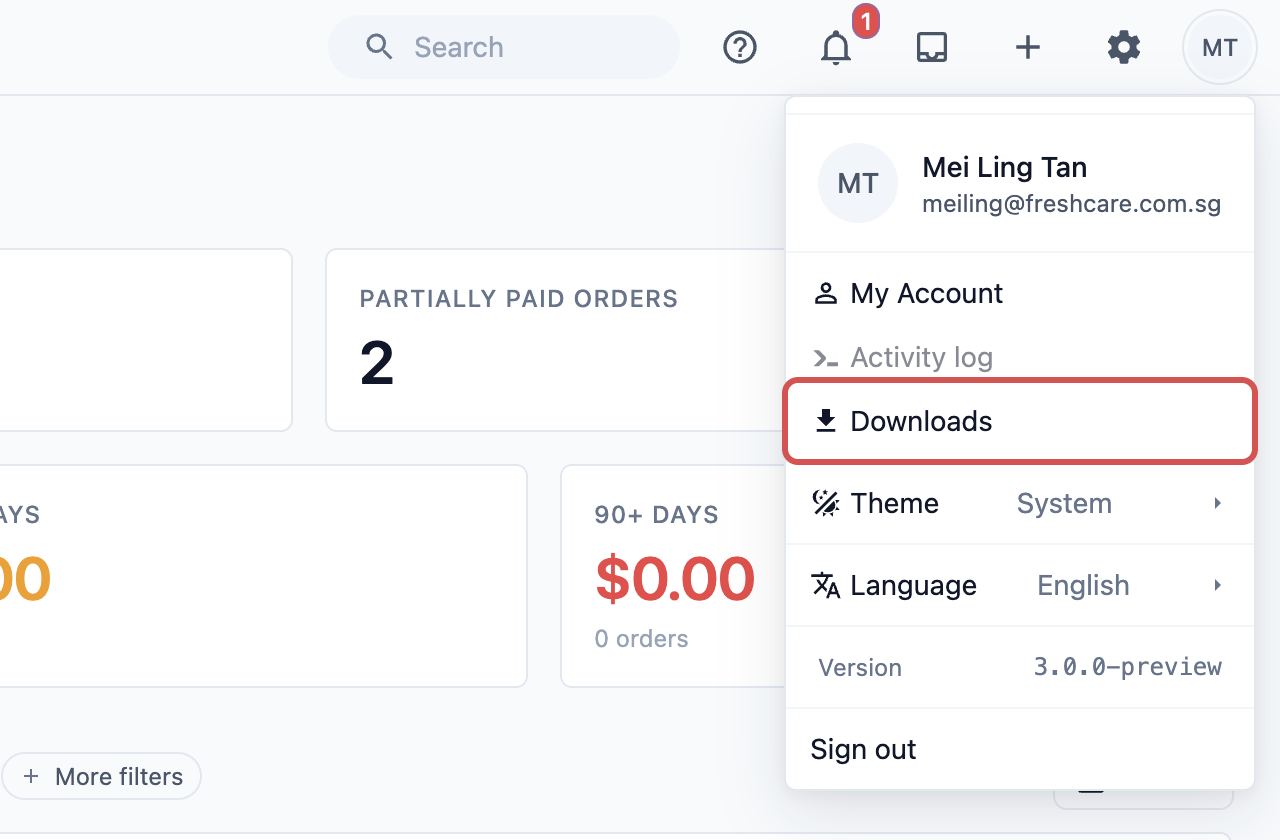
Downloads holds the files you export. To export means to save a report as a file, such as an Excel sheet, so you can keep it or send it to your accountant.
1. Click your profile picture at the top right of the screen.
2. Click Downloads.
You'll learn how to export a report and collect the file in [Exporting Reports and Downloads](/docs/exporting-reports-and-downloads).
## Which report answers which question
| Your question | Open this |
|---|---|
| How much money came in yesterday? | Reports › Payments |
| How much did we sell this month? | Reports › Sales |
| Which customers still owe us money? | Sales › Receivables |
| How much store credit do customers still hold? | Reports › Credits |
| How much did the workshop finish this week? | Reports › Production |
| Are my customers coming back? | Reports › Contacts |
| Are we answering enquiries fast enough? | Reports › Deals |
## Example: FreshFold Laundry's morning check
FreshFold Laundry has two outlets. Every morning before opening, the owner, Mei Ling, checks two things: how much the shop took in yesterday, and who still owes money.
First, yesterday's takings:
1. Mei Ling clicks Reports, then Payments.
2. The report opens on this month. She clicks Daily to see today.
3. She clicks the left arrow next to the date once to go back to yesterday.
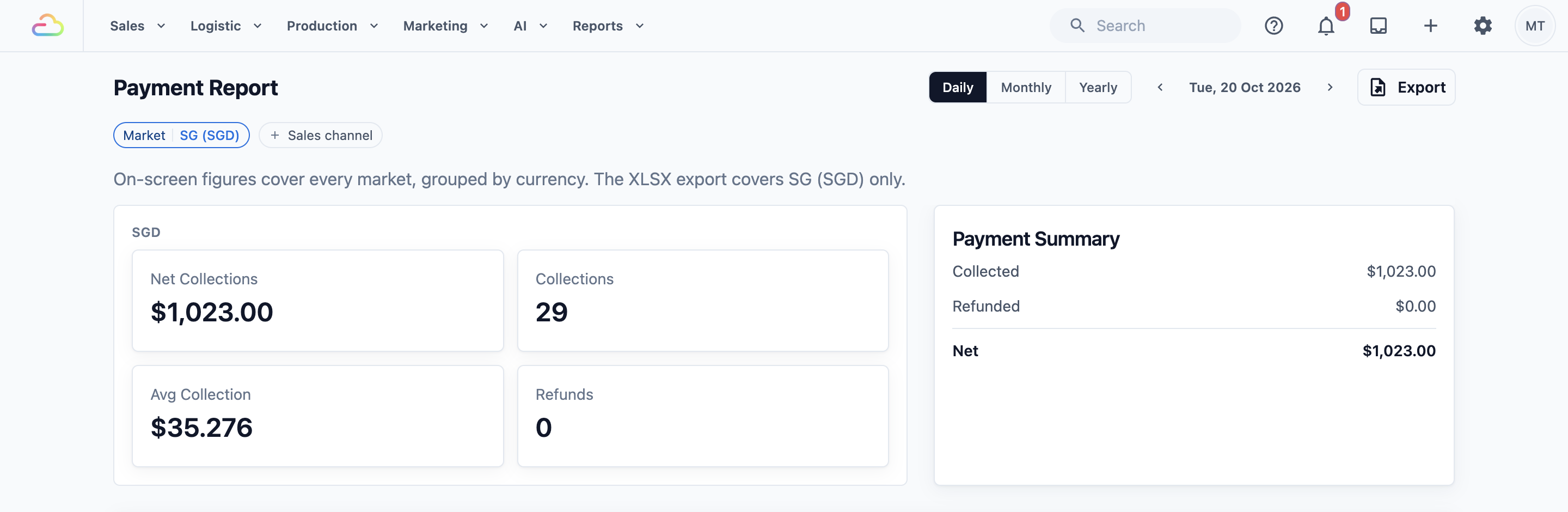
4. She reads Net Collections. This is the money both outlets collected yesterday, after refunds.
Next, the unpaid bills:
5. She clicks Sales, then Receivables.
6. She reads Total Outstanding, the total her customers still owe.
7. She looks at the Aging cards. They group the unpaid orders by how long they have been waiting, such as 0-30 days or 90+ days.
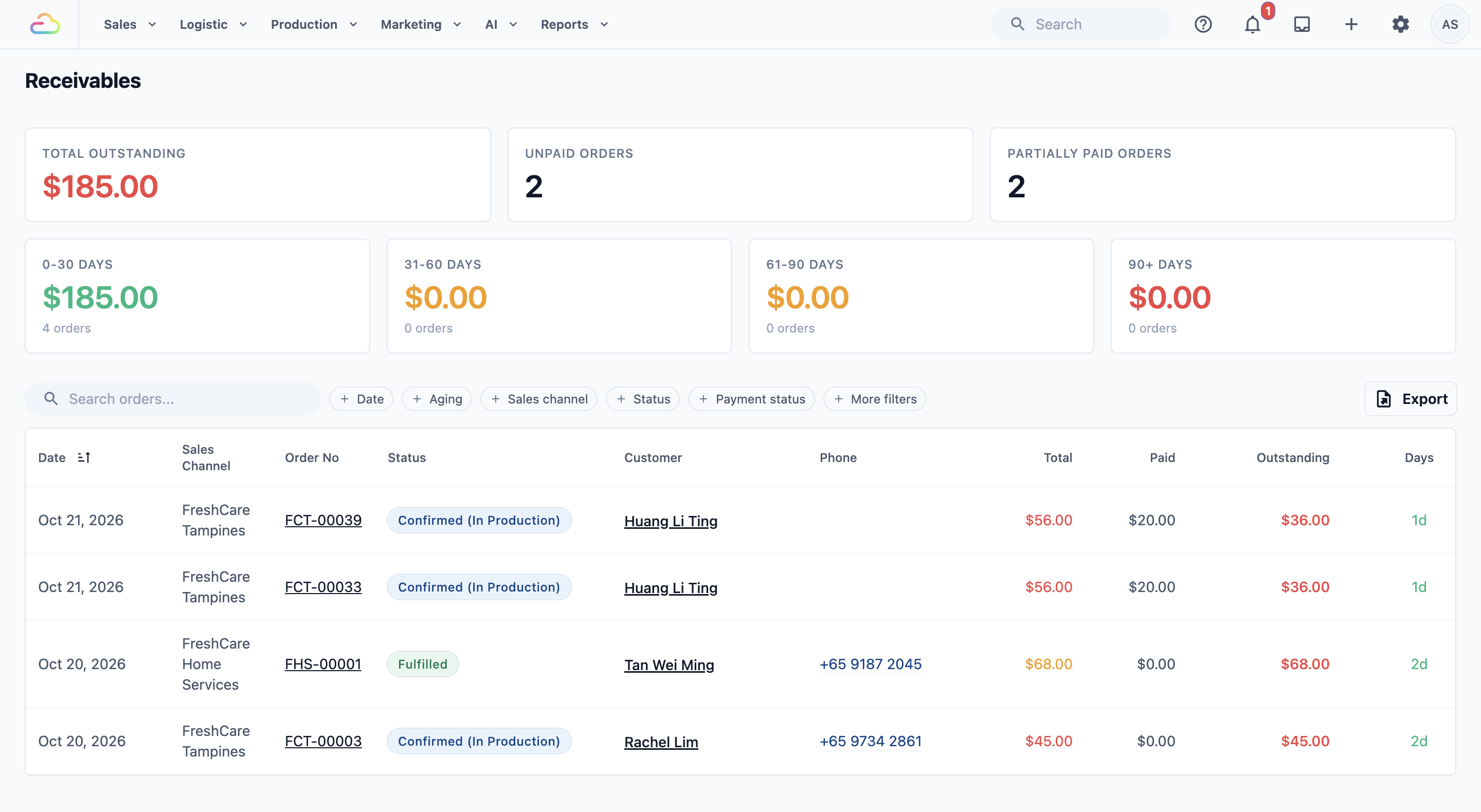
8. She scrolls down to the list of orders and sees one hotel customer with a bill over 60 days old. She calls them before the shop gets busy.
In two minutes, Mei Ling knows her takings and who to chase. You'll learn to read the Payments report in full in [Reading the Payments Report](/docs/reading-the-payments-report), and Receivables in [Tracking Receivables](/docs/tracking-receivables).
## FAQs
**Why can't my staff see the Reports menu?**
>Each staff member only sees the reports you opened for them. If you opened none, the whole Reports menu is hidden from them. [Giving Your Staff Access to Reports](/docs/report-access-for-staff) shows how to turn reports on, person by person.
**Do reports include every outlet?**
>Yes. A report adds up all your sales channels unless you narrow it. To see one outlet, choose it in the Sales channel or Location filter at the top of the report. If you trade in both Singapore and Malaysia, the Sales report shows one country at a time, so pick it in the Market filter.
**Why don't the Sales and Payments reports show the same amount for yesterday?**
>Sales counts what you sold that day. Payments counts the money that came in that day. A customer who drops off on Monday and pays on Wednesday adds to Monday's sales but Wednesday's payments. [Sales vs Payment Totals](/docs/sales-vs-payment-totals) explains every reason the two differ.
**Why is E-Invoice missing from my Reports menu?**
>E-Invoice is only for businesses in Malaysia. It appears once your business has a Malaysia market set up. A market is the country you trade in, with its own currency and tax. Your staff also need access to the money reports to see it.
## What's next
Continue to [Giving Your Staff Access to Reports](/docs/report-access-for-staff) to choose which reports each staff member can open.