## Before you start
- Sign in to the Console. The Console is the back-office website where you run your business.
- This report counts push notifications. A push notification is a short alert that pops up on your customer's phone or computer from your Mobile App or Online Store, like "Your order is ready for pickup".
- Your customers only get pushes if they use your Mobile App or Online Store and said yes when asked to turn on notifications. They are asked after they place an order or send you a message in Live chat.
- Your customer notification rules must include a push message. A notification rule is a setting that says which message goes out when something happens to an order, such as when it is ready.
- The account owner can always open this report. Your staff need access to the Contacts report to open it. [Giving Your Staff Access to Reports](/docs/report-access-for-staff) shows how.
---
## What the Notifications report is for
The Notifications report shows how your order alerts reached your customers this month. It counts how many pushes arrived, how many failed and how many customers tapped them. It also counts the WhatsApp messages you did not need to send because a push got there first.
It helps you decide one thing: is push doing the job, or are you still paying for most of your updates by WhatsApp? If few customers get your pushes, you can encourage them to turn notifications on, for example at the counter when they collect.
Without it, you cannot tell whether your customers see your alerts at all. You also would not know how many WhatsApp messages push saved you each month.
---
## Open the Notifications report
1. Sign in to the Console.
2. In the menu bar at the top of the screen, click Reports.
3. Click Notifications.
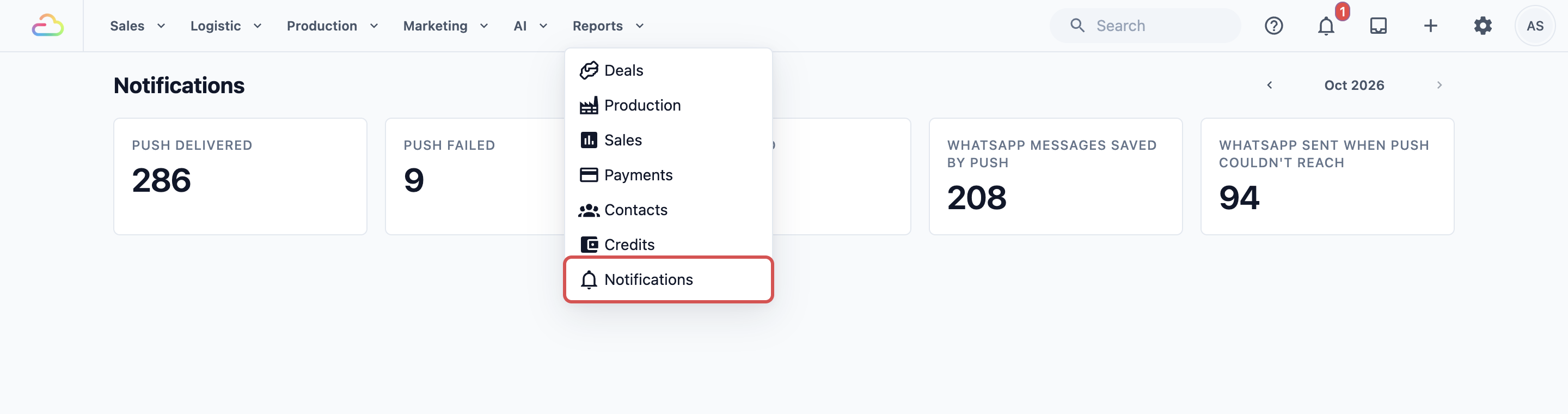
The report opens on the current month.
4. To see an earlier month, click the left arrow next to the month name at the top right. The right arrow takes you forward again. You cannot go past the current month.

---
## Read the push cards
The first three cards tell you how your pushes went.
- Push delivered: pushes that Apple, Google or the customer's web browser accepted for their device. This means the alert was handed over to the phone or computer.
- Push failed: pushes that could not be handed over. This usually means the customer deleted your app or turned notifications off. EasyBiz stops sending to that device by itself, so you don't need to clean anything up.
- Push opened: pushes a customer tapped to open your app or store.
Each card counts devices, not customers. A customer who uses your app on a phone and your Online Store on a laptop counts twice.
---
## Read the WhatsApp cards
The last two cards only count notification rules that have both a push message and a WhatsApp message.
- WhatsApp messages saved by push: WhatsApp messages that did not go out, because the push already reached the customer. Each one is a WhatsApp message you did not pay for.
- WhatsApp sent when push couldn't reach: WhatsApp messages that went out because the customer had no device that could take the push. These customers still got their update, just by WhatsApp instead.
This only works while the switch Send WhatsApp only when push can’t reach the customer is on in the rule. It is on by default. To check it:
1. In the menu bar, click Settings.
2. Under Templates, click Event Notifications. It opens on Customer Notifications.
3. Click the rule you want, such as your ready for pickup rule.
4. Click the Push row.
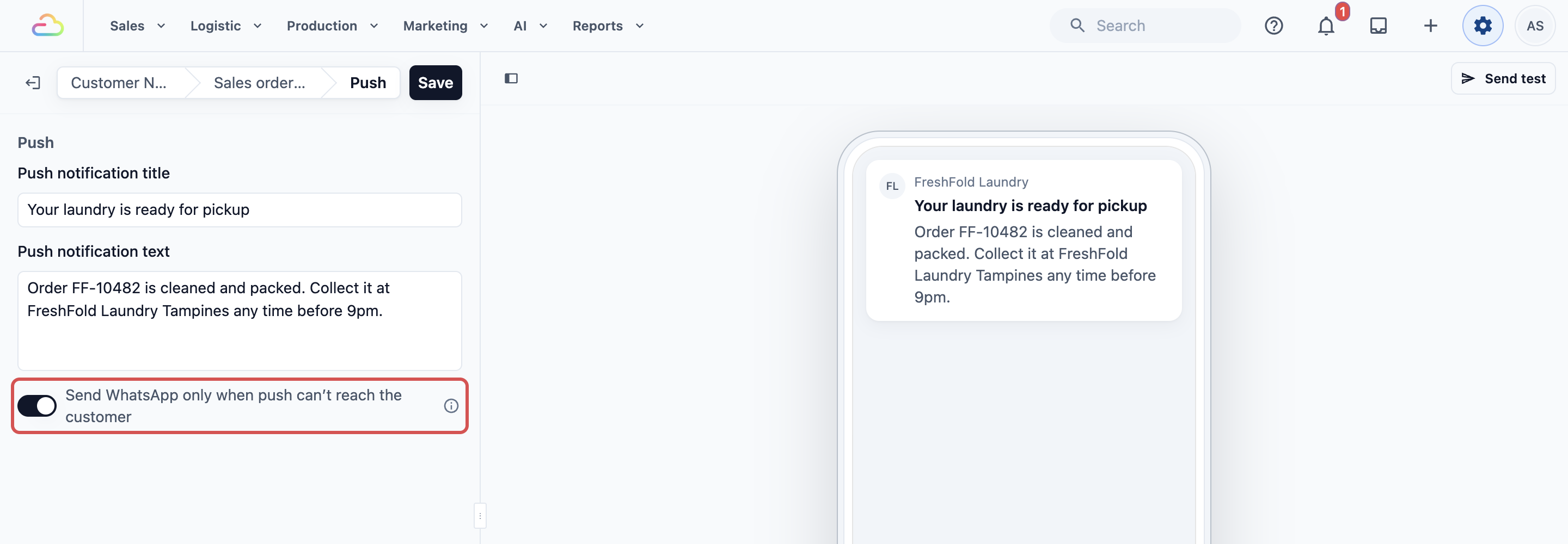
If you turn the switch off, customers get both the push and the WhatsApp message. Those WhatsApp messages are not counted in either card.
---
## What a good open rate looks like
Your open rate is how many delivered pushes your customers tapped. The report does not show it as a percentage, so work it out yourself: divide Push opened by Push delivered.
There is no fixed target to hit. Many customers read a short alert like "ready for pickup" on their lock screen and never tap it. They still got the message. So a low open rate does not mean your alerts are ignored.
The best guide is your own trend. Check the same rate each month. If it drops sharply, read your push message again. Make sure the title says clearly what happened, such as the order number and "ready for pickup".
---
## Example: FreshFold Laundry checks its pickup alerts
FreshFold Laundry sends a push and a WhatsApp message when an order is ready for pickup. The owner, Mei Ling, wants to know if customers read the push, and how much WhatsApp she saved last month.
1. Mei Ling clicks Reports, then Notifications.
2. She clicks the left arrow once to go back to last month.
3. She reads the push cards: Push delivered 420, Push failed 12, Push opened 168.
4. She works out her open rate: 168 ÷ 420 = 40%. Last month it was 38%, so her customers are still reading her alerts.
5. She reads the WhatsApp cards: WhatsApp messages saved by push 310, WhatsApp sent when push couldn't reach 140.

6. She sees that 310 of her 450 pickup messages went by free push. The other 140 customers still got WhatsApp. She asks her staff to remind those customers at the counter to turn on notifications in the FreshFold app.
Next month, Mei Ling checks again to see if more of her updates went by push.
---
## FAQs
**Do WhatsApp messages cost money?**
>Yes. WhatsApp charges a fee for each update message a business sends, and you pay it directly to the provider. Push notifications from your Mobile App or Online Store are free. That is why every message in WhatsApp messages saved by push is money you kept.
**Why is a customer not receiving pushes?**
>The customer may not have turned on notifications, or may have said no when asked. They may have switched off Order updates under Account › Notifications in your app or store. A device that hasn't opened your app or store in the last 30 days, or that deleted your app, is also skipped. On an iPhone, your Online Store can only send pushes after the customer adds it to the Home Screen. If the rule has a WhatsApp message, these customers get it on WhatsApp instead.
**Why can't my staff see the Notifications report?**
>It shares its access with the Contacts report, because both are about your customers. Give the staff member access to the Contacts report to show Notifications too. If your team uses seats, only an Admin seat opens it.
**Why is Push delivered higher than WhatsApp messages saved by push?**
>Push delivered counts every device, so a customer with two devices counts twice. WhatsApp messages saved by push counts one per message. Rules that only send a push, with no WhatsApp message, also add to Push delivered but never to the WhatsApp cards.
**Why did a push sent early on the 1st appear in last month's numbers?**
>The report counts each month by world standard time (UTC), which is 8 hours behind Singapore and Malaysia. So a new month starts in the report at 8am on the 1st. Pushes sent between midnight and 8am on the 1st count in the month before.
**Why do earlier months show zero?**
>The report only counts pushes from the time your business started sending them. Months before that show zero for every card. Test pushes you send while setting up a rule are never counted either.
---
## What's next
Continue to [Reading the Deals Report](/docs/reading-the-deals-report) to see how many customer enquiries came in and how many became orders.